Secure system administration
Page 5 of 6
Use privileged access management
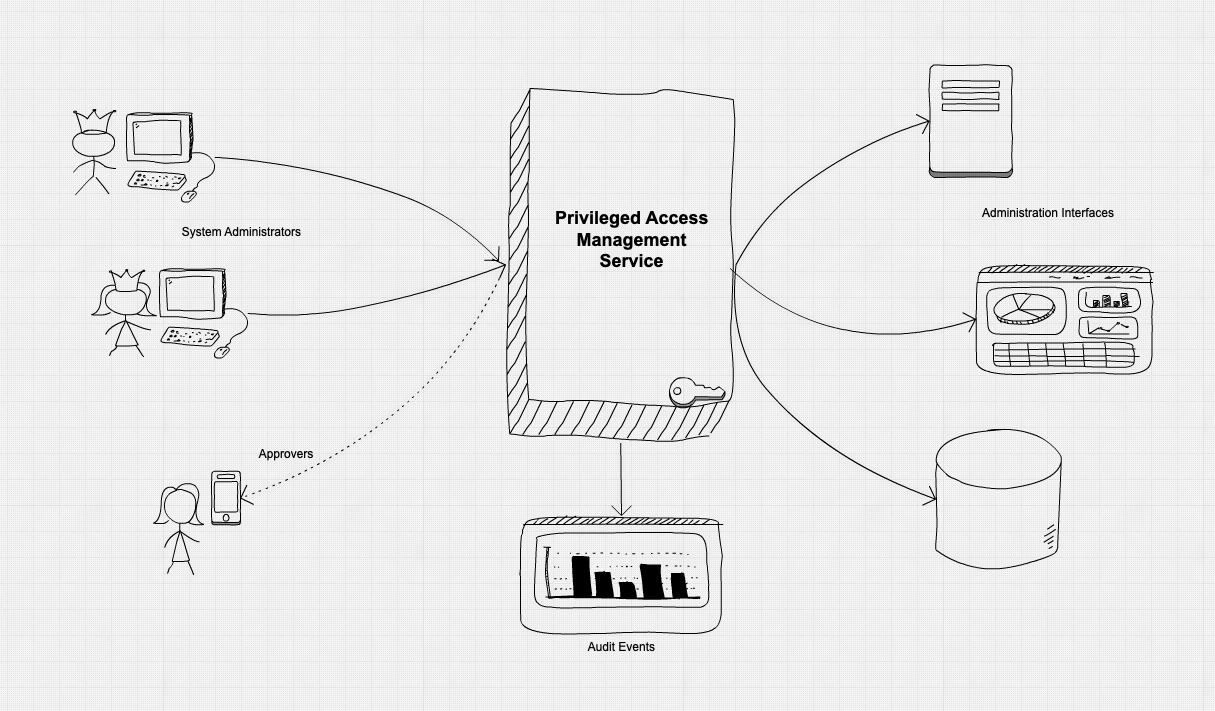
Privileged Access Management (PAM) is an additional security measure that you can place in front of your system administration interfaces.
What is Privileged Access Management?
PAM is based on two central concepts: Just in time Administration and Just enough Administration. We explore these below.
PAM provides many benefits:
- It will make it more difficult for an attacker to pivot into critical services, from an already compromised management access workstation.
- It will introduce an additional source of auditing, making it easier to identify misuse of administration interfaces. This will act as a strong deterrent against the insider threat, where a legitimate system administrator may consider abusing their access.
- It will introduce additional guard rails to help system administrators. They will hold less responsibility to protect their access credentials. It will help protect them from accidentally making unintended changes.
Privileged Access Management may help you to achieve these security benefits, by providing an additional set of security functions on top of traditional authentication.
Figure 1: A high level architecture for privileged access management
Just in time Administration
Traditionally, a system administrator will use some sort of credential to access an administration interface. Possession of this credential will then associate the user to a set of high privileged functions. A system will accept this association, and allow the system administrator to perform highly privileged functions.
The problem is that, if an attacker steals these credentials, they will be granted the same level of system administration access. An attacker's ability to use this credential could cause significant harm to your system and the data it processes.
Just In Time administration helps with this. Instead of the credential being used to access an administration interface, it's used to Request access instead. If the request is approved, a Temporary credential is given to the system administrator. This temporary credential is what the administrator uses to access the system's high privileged administration interfaces.
This makes compromise more difficult for an attacker.
- If an attacker has compromised an administrator's workstation, they will still have to overcome the request and approvals process before they can cause harm to your systems, or access its data.
- If the attacker has stolen the temporary access credential, their window of opportunity is significantly reduced. The credential will only work for a short period before it becomes useless.
Approval process
When a system administrator requests an administration credential, there are different ways in which it can be approved or rejected. This is called the approval process.
The approval process needs to be carefully considered. It must be accessible and timely enough to enable administrators to perform their job. At the same time, it's a function that can be used to gain a greater amount of control and certainty before a person is permitted access to an administration interface.
If an attacker has managed to request a credential, the approval process will make it more difficult to gain access to your systems because they’ll need explicit authorisation.
Potential approval processes include:
- Multi-party approval. An administrator's credential is only released if a different, authorised individual(s) approve it. For example, using a two-man rule through an approval action on a mobile device.
- Consensus. When a group of two or more people ‘vote’ to approve the release once a threshold is met. For example, using an instant messaging chat channel shared by engineers.
- Rule based auto approval. When a specific criteria is met, the credential is automatically approved without human intervention. For example, through integration with ticket tracking software.
The appropriate level of approvals process will be a risk management decision. It should be based on the perceived risk from the devices used to access the interface, and the impact if an attacker was able to access the administration interface.
Just enough Administration
In system administration, it is common for administrator's credentials to grant a very high level of permissions on a system. The terms ‘Root’, ‘administrator’ and ‘superuser’ are often used to describe this type of access.
If an attacker obtained this access, they could cause great harm to your systems. They could turn critical systems off, run malicious actions or access sensitive data. Depending on the system, this could have catastrophic consequences.
This level of access grants an administrator the flexibility to do anything on a system. In some rare cases this flexibility may be justified. However, an administrator rarely needs to do ‘everything’. Full, system wide access should be the exception, not the norm.
When a system administrator connects to a management interface, it’s best to have a specific function or purpose in mind. The administrator should be granted ‘just enough’ permissions to perform this job.
Just enough Administration is another way of describing the concept of least privilege. The roles and responsibilities of system administrators can be defined in advanced. When an administrator requests access to an administration interface, they should be prompted to select one of these roles.
Enabling the approvals process
This enables the approvals process. Releasing credentials that have a lower level of potential impact if compromised is less concerning. Further, the administrator is protected from accidentally carrying out a highly destructive action. Having roles defined in advance also makes it easier for the administrator requesting credentials, as they don't have to put as much thought into what access they need.
Requests for credentials that would allow an attacker to cause a large amount of damage can then be carefully considered. Risk decisions can then be made, based on the access being requested by the administrator.
Insider threat deterrent
It’s inevitable that some people in your organisation will need high levels of system administration access. It’s possible to perform due diligence security checks on these people, but this does not guarantee that they will be trustworthy, or that their personal circumstances will not change over time.
It is almost impossible to prevent someone with malicious intent from causing harm to your systems if they are in this position. However, using PAM significantly increases the deterrent.
The PAM process forces an individual to request and justify their intended actions each time administration access is required. It makes them stop, pause and think. These actions are also all recorded, through the collection of logs which should feed into an auditing function.
Implementing PAM increases the chance of a malicious insider getting caught. This helps prevent the insider thinking that they can get away with it and it provides auditing information that can be used for prosecution. This may be enough to dissuade a malicious insider from doing harm to your systems.
Implementation guidance
- Only allow permitted devices. Using architectural controls, only allow devices you trust the ability to access the PAM service, and your administration interfaces. This will reduce the attack surface of your management interfaces, and the PAM service itself.
- Only allow Permitted Users. Using strong authentication, only allow permitted administrators to log in, and request administration credentials. This will reduce the attack surface of your management interfaces, and the PAM service itself.
- Justify administration Intent. Administrators should be required to justify their administration as part of the request process. Just enough administration can then be based upon this intent. It will help to support the approvals process, and help deter malicious insiders. It will serve to remind the administrator of the task at hand, helping them to avoid accidental changes to the systems they are administering. Each request for administrator credentials could be tied to a support ticket to help document what the intent is.
- Use appropriate approvals. Carefully consider the request and approval rules that govern access to your administration interfaces. What you consider appropriate will be based on the risk properties of your system. Consider the impact if an attacker managed to access the administration interface, and use this as the basis for your decisions.
- Use Secure and strong credentials. The credentials that the PAM service issues should be cryptographically strong, and cryptographically protected in transit. This will prevent an attacker trying to crack a login credential, or steal it when used across a network.
- Constrain credential validity period. Reduce the time frame that an administration credential can be used. If an attacker does manage to steal a credential, their window of opportunity to use it will be significantly reduced. Keep in mind that a legitimate administrator will need enough time to perform their task. Assess your requirements to strike an acceptable balance.
- Use least privilege on administration roles. Provide system administrators with 'Just Enough' permission to get their job done. Over-zealous permissions are unnecessary, and add risk to your systems.
- Protect the PAM system. The PAM system is itself an attack surface. It will control access to your systems, making it an attractive target for an attacker. Make sure access to it is constrained, using architectural controls. Ensure that it is regularly patched, and carefully configured. Enrol the PAM service in your security monitoring strategy.
- Consider PAM availability. Consider the impact if the PAM service becomes inaccessible, and administrators cannot use it to request access to administer your systems. Consider deploying PAM using high availability and having an emergency back up process for accessing your systems if needed. Make sure this the 'break-glass process is carefully protected.
Example Scenario A - Small Company
Small company uses SSH to connect to a front end web server, that hosts an information-only website.
In this scenario, the impact of compromise is restricted. It would allow an attacker to gain control of a front end web server which could lead to to a loss of reputation.
PAM is not currently implemented in this company. However, they have researched the topic and understand the benefits that it can bring. They intend to implement it shortly.
Due to the small number of administrators in the company, they have decided to adopt a ‘light touch’ approvals process. Administrators will need to request temporary credentials and note down the reason behind each request. A shared ‘approvers’ mailbox will receive an email and those with access to this can reply in order to grant access.
This implementation ensures that an administrator cannot act maliciously on their own. Critically, it doesn’t impact the administrator's workflow substantially.
Example Scenario B - Large Company
A Critical National Infrastructure company uses a thick client to control a valve in their OT environment.
In this scenario, the impact of the administration interfaces being compromised is critical as the system provides an essential service to citizens.
The company have implemented a full PAM solution that is integrated into many other tools that they rely on daily.
Before an administrator can request a temporary token, they must have an open issue in the company’s issue tracker. This will require a level of scrutiny in itself.
When requesting a temporary credential, the administrator must select the issue from a drop down box that will be populated with issues assigned to them. They must fill in a number of other fields in this request form, including how long they want the credential to be valid for.
The request is then sent to a group chat in an instant message application. Here, approvers with the right level of authority can vote on the request. After two positive votes, the credential is released and the administrator can carry out their task.
This implementation of PAM makes it significantly harder for an insider attack to occur. Further, it makes an innocent mistake less likely, as there is significant oversight throughout the process.
Related references
- Privileged Access Management for Active Directory Domain Services
- How Netflix gives all its engineers SSH access to instances running in production
- Building Secure & reliable Systems, authors: Heather Adkins, Betsy Beyer, Paul Blankinship, Piotr Lewandowski, Ana Oprea, Adam Stubblefield. Published by O'Reilly. ISBN: 978-1-492-08313-9