Secure system administration
Page 3 of 6
Protect your administration interfaces
Administration interfaces need protecting with a mix of technical and procedural controls.
An administration interface is the means through which you access the system you wish to administer. It allows a person to carry out privileged activities that are not available to a standard user. As such, administration interfaces need protecting with a mix of technical and procedural controls.
What makes an admin interface?
There are a wide variety of administration interfaces for different technologies. For example:
- Remote management protocols such as SSH, PowerShell, RDP and VNC
- Browser-based management such as cloud-based web consoles and appliance configuration panels
- APIs that expose management functionality
- Thick clients - typically, software installed on a device that drives an administration protocol or API in the background
Some systems are managed through code and configuration files rather than the interfaces listed above. This can also be a form of system administration. For comprehensive advice on this topic, see the Secure development and deployment guidance.
Administration proxies (Bastion Hosts & Jump Boxes)
Administration proxy is a generic name we use to refer to services such as bastion hosts and jump boxes.
Administration proxies work by placing an intermediary service between a device, and the system being administered.
The proxy may simply pass requests between the two systems, acting as a traditional proxy that forwards requests. Similarly, an administrator may first connect to the administration proxy, before using an administration interface.
Administration proxies can be used consciously by administrators, or operate transparently in the background. Some examples of an administration proxy are:
- Where an administrator connects using RDP from their management device to an intermediary terminal server, and then onward to the administration interface.
- Where an administrator connects with SSH from their management device to an intermediary SSH server, and then onward to the administration interface
- Where an administrator connects to a management web interface via an intermediary reverse proxy.
Figure 1: Using an RDP jump box to connect to an administration interface
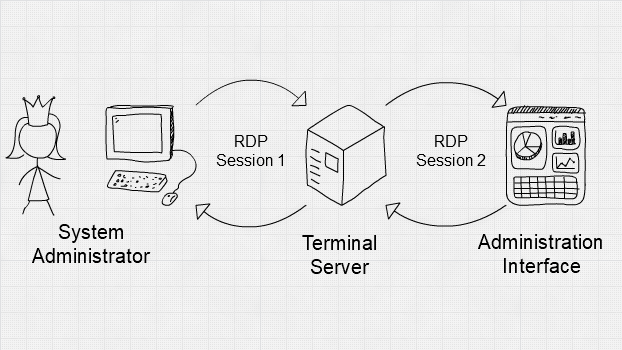
Administration proxies are a central point where security functions may be applied. In this way, they can funnel access to your administration interfaces.
For example, proxies can:
- Apply authentication controls governing who can connect, and from where.
- Implement technically enforced administration policies.
- Create activity logs, to be used for auditing and monitoring.
These are all desirable security properties for system administration. But, an administration proxy is not the only way to implement them.
Don’t browse up
Remember, if you’re using browse up, an administration proxy alone will not stop a compromised management device from impacting your administration interfaces.
Compromising a device may still allow the attacker to gain access through an administration proxy. See 1 - Gain trust in your management devices
Lock-out potential
It’s also worth considering that using an administration proxy introduces a single point of failure to your architecture. If the proxy fails, administrators will not be able to send commands to the intended interfaces.
Administration proxies need to be highly available. It's always a good idea to have in place back up, ‘break glass’ access to your systems. Don’t lock yourself out.
Emergency access (or ‘break glass’ access)
There are some activities that should only be performed in an emergency, when normal methods have failed. This might include manual human access to production environments, use of emergency administrator identities, or changing critical security controls.
Emergency accesses may need to be used as part of your incident response, so the way you protect them may be different from normal administration activities. For example, emergency access may be protected with an exceptionally long password, but might not be limited to specific devices or networks. This means that the emergency access can be used from new devices if your primary devices or networks are unavailable.
As emergency accesses should be exceptional, alarms should trigger when they are used. This should ensure that these processes are only to be used in exceptional circumstances and any unauthorised use is investigated promptly. See 5 - Log and audit administration activities for more information.
Reduce the exposure of administration interfaces
Administration interfaces are an attack surface. Only legitimate administrators should be able to communicate with them. You should isolate these interfaces using architectural controls and constrain who can connect to the system and from where. This will help to protect against attacks such as brute forcing administrator login, or using an exploit to gain access.
There are a number of ways that you can reduce the exposure of your management interfaces. For example:
- You could create a dedicated management network that only authorised administrators have physical access to.
- You could place your administration interfaces behind a VPN that only authenticated administrators and devices can use.
- You could implement an IP allow list to restrict the devices or networks that can access the administration interface.
Some architectural controls are stronger than others. For example, IP allow lists can be overcome if the attacker is able to share the IP address space, or spoof it. They can also be difficult to maintain.
Depending on your risk appetite, it may be necessary to combine multiple mitigations to adequately protect your administration interfaces.
The mitigations that you choose will depend on a number of factors, including where the interface is located, what it allows access to and who the administrators are that need access to it.
Implementation guidance
- Only permit authorised devices. It should not be possible for untrusted devices to access your administration interfaces. Architectural controls should be implemented to ensure that the origin of administration activities is a trusted device. This helps to reduce the attack surface.
- Use browse down, not browse up. If an attacker compromises a less trusted device, they will inherit its accesses. If that device can be used to browse up to a more critical system, the attacker can do so too. See 1 - Gain trust in your management devices for more information.
- Authenticate the administrator. Administrators must be authenticated before carrying out their duties. Authentication should be achieved using well known protocols.
- Utilise multi-factor authentication. Where available, MFA should be enabled on administrator accounts. This introduces a high hurdle for an attacker to jump, but has little effect on administrators. Remember that this isn’t bulletproof: if an adversary has access to the PAW, they can piggyback on an authenticated session after MFA has been completed.
- Protect your administration credentials. Discourage administrators from writing credentials on post-it notes and consider the use of a password manager. Also ensure that credentials are not hard-coded into software projects, as they could mistakenly be published to a code repository. If certificates are used for authentication, carefully protect them. See our password guidance for more information.
- Use Privilege Access Management. See 4 - Use privileged access management for more information.
- Use secure protocols. The protocol that is used to carry traffic from a Privileged Access Workstation to the administration interface should be encrypted. If it is not, an attacker could view the traffic and manipulate it. For example, APIs using HTTPS should be preferred over Telnet. You should investigate what protocol is used by any thick client and ensure that these connections are protected too.
- Update your administration infrastructure. Updates should be installed to ensure that your systems are patched against known vulnerabilities. These updates should be installed as soon as possible, because attackers put effort into understanding them, searching for the vulnerabilities that they patch.
- Monitor administration activities. See 5 - Log and audit administration activities for more information.
- Implement procedural policies governing system administrators. System administration policies should cover a wide number of topics. For example, the number of administrators should be bounded with upper and lower limits that are appropriate to your environment. Further, the principal of least privilege should be applied, and a robust 'joiners, movers and leavers' process should be defined.
Example Scenario A - Small Company
Small company uses SSH to connect to a front end web server, that hosts an information-only website.
In this scenario, the impact of compromise is restricted. It would allow an attacker to gain control of a front end web server, which could lead to a loss of reputation.
Administrators at this company use their standard workstations to access administration interfaces. They’ve previously acknowledged that this is a browse up architecture that goes against best practice.
In order to protect the administration interface as best as they can, they install an administration proxy. Administrators will be required to access this proxy before they can communicate with the web server. This alone doesn’t mitigate any risks, so they enforce multi-factor authentication on this proxy.
They also use the administration proxy as a central point from which to monitor access to the administrator interface. Access to the web server should not be too frequent and so alarms are configured to trigger each time it is accessed.
Administrators use SSH to connect to the web server. To further protect this connection, certificates are issued to each administrator and locked to their workstations. This means the certificates cannot be exported and used on another device.
Example Scenario B - Large Company
A Critical National Infrastructure company uses a thick client to control a valve in their OT environment.
In this scenario, the impact of the administration interfaces being compromised would be critical, as the system provides an essential service to citizens.
Only dedicated and carefully locked down PAW’s are used. They have conducted some research on the thick client software and determined that the protocol in use behind the scenes is proprietary, unencrypted and insecure. They have mitigated this risk by implementing a VPN that mutually authenticates and encrypts the administration communication, protecting the insecure protocol.
They have decided not to use a jump box. Instead, applying security controls to the PAW’s themselves.
The management interfaces can only be accessed from PAWS, connected to a dedicated management network. Both the network and PAW’s are only accessed from a secure office.
The thick client software only allows username and password authentication, with no password policies or support for MFA. This was unacceptable for the company, so they chose to implement MFA to log into the PAW’s, and use mutual certificates on the VPN.
Even though poor passwords may be used, there are then additional controls that will make it more difficult for an attacker to target the system.