Secure system administration
Page 2 of 6
Gain trust in your management devices
The devices you use to access your system administration interfaces must be trustworthy.
Management devices
These are the devices that you use to perform system administration. They come in all shapes and sizes: laptops, desktops, phones and tablets.
We care about the security of management devices because they are used to access our administration interfaces. If an attacker compromises one of these devices, they could inherit the same level of access. This could lead to your service being disrupted or your data being stolen.
You may use a physical device and jump box to administer your system. In the context of this guidance, both of these are considered management devices. For more information on jump boxes please see 2 - Protect your administration interfaces.
Privileged Access Workstations (PAWs)
Dedicated management devices are often referred to as privileged access workstations (PAWs). It is quite common to use these when administering higher tier services. See 3 - Risk manage administration using tiers for more information.
If you are allowing a device to connect to your administration interfaces, you should to be able to trust it. This makes it less likely that an attacker will be able to use the device to access your systems, instead of a legitimate system administrator. See 2 - Protect your administration interfaces.
If your administration access could be considered high risk for your organisation, with significant impact if it is compromised, you should review the NCSC PAW principles and follow the guidance there.
Trust
Computer systems rarely exist in isolation. That is, they connect to networks and other systems. You might trust some of these other networks and systems more than others, and the owners of those might not trust yours at all. We use the terms, less trusted (or low side) and more trusted (or high side)
Less trusted (or low side) refers to the system in which we have less confidence of its integrity
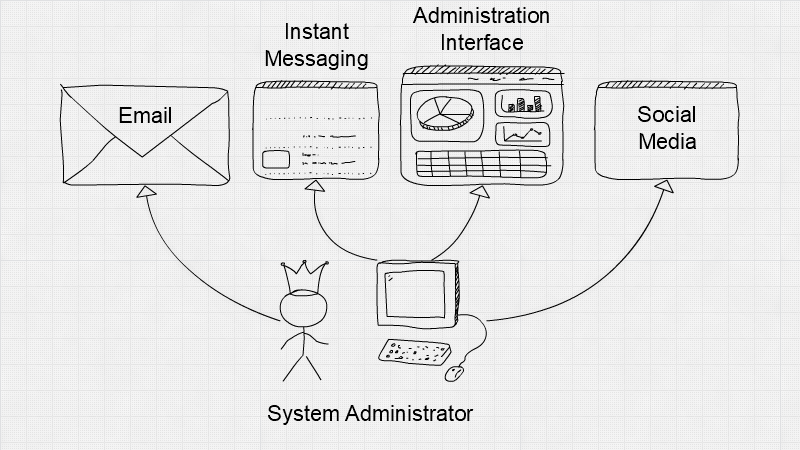
- One reason you might have less trust in a device is if it has access to emails. This puts the device at risk of phishing, which is one of the most common methods of initial compromise.
Figure 1: System Administrator accessing administration interfaces from the same device as they access emails, social media and instant messaging platforms.
More trusted (or high side) refers to a system in which we have more confidence of its integrity
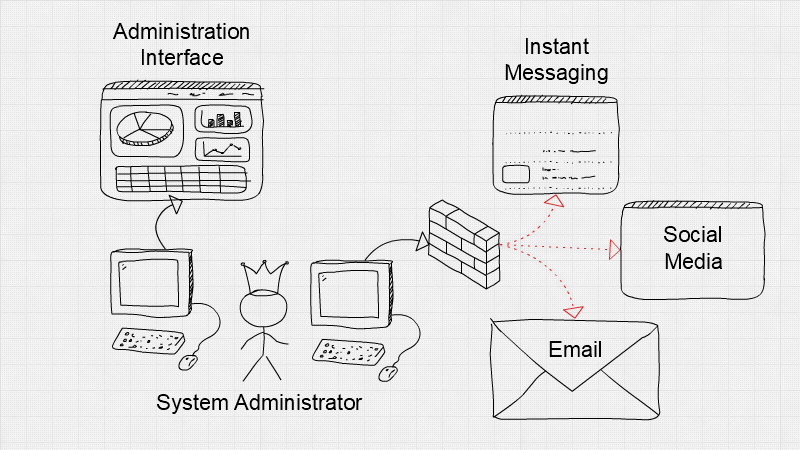
- One reason you might have more trust in a device is if it doesn’t have a direct connection to the internet. This can be achieved by applying architectural controls which will reduce the attack surface of the device.
Figure 2: System Administrator accessing administration interfaces from a different device.
Browse down, not up
When administration of a system is performed from a device which is less trusted than the system being administered, we call this browse up. This is an anti-pattern, which we do not recommend.
Instead, you should use browse down. This is when you trust your device just as much, or more, than the system you are administering.
Implementation guidance
- Carry out a risk assessment. Consider the possible impact of an attack on your system. This should determine what security controls are appropriate for your management devices.
- Reduce the attack surface. Apply technical controls, such as lock down policies, trusted boot and thin client technologies. This will limit the attack surface exposed by your management devices, making it harder for attackers to compromise them.
- Use PAWs for high-risk systems. If the impact of compromise would be significant for your organisation, review the NCSC PAW principles and consider putting in place a PAW.
- Device trust needs to be earned. Your initial stance should be not to trust devices until you have gained the assurance you need to do so. This is particularly the case when operations are outsourced to a third party.
- Use 'browse down', not 'browse up'. If an attacker compromises a less trusted device, they inherit its accesses. If that device can be used to browse up to a more critical system, the attacker can too.
Example Scenario A - Small Company
Small company uses SSH to connect to a front end web server, that hosts an information-only website.
In this scenario, the impact of a compromised administration device is restricted. It would allow an attacker to gain control of a front end web server, which could lead to to a loss of reputation.
The company doesn’t have a lot of spare money, so it can’t afford to purchase PAWs. Instead, administrators use workstations that have access to the internet and emails but they stringently follow the NCSC’s mobile device guidance to minimise the risk of compromise.
The company acknowledges that this is browse up architecture and using the devices in this way still carries risk. They choose to accept this however, as the impact of a compromise is low and any other solution would hamper the growth of the company.
Example Scenario B - Large Company
A Critical National Infrastructure company uses a thick client to control a valve in their OT environment.
In this scenario, the impact of the administration interfaces being compromised is critical, as the system provides an essential service to citizens.
The company choose to use dedicated PAWs to carry out management functions. These devices are separate to their enterprise devices, where emailing and web browsing occurs. Policies are technically enforced on these devices to significantly reduce the attack surface of the device.
This may introduce friction for an operator carrying out their duties. They will need to use a dedicated PAW in a secure location and it may cost the business more to implement and maintain the PAWs. However, all of this is deemed worthwhile in order to appropriately protect the system, due to the impact a compromise could have.
Related references
- https://www.ncsc.gov.uk/collection/principles-for-secure-paws
- https://www.ncsc.gov.uk/collection/end-user-device-security
- https://www.ncsc.gov.uk/whitepaper/security-architecture-anti-patterns
- https://www.ncsc.gov.uk/blog-post/protect-your-management-interfaces
- https://docs.microsoft.com/en-us/windows-server/identity/securing-privileged-access/privileged-access-workstations