Secure system administration
Page 4 of 6
Risk manage administration using tiers
Not all administration is the same.
The potential impact of a compromised or misused administrator account will vary. Some could have a catastrophic effect on your business. Others will be less damaging.
Examples of highly critical administration
- The ‘root’ account of a cloud service control panel, for a production environment.
- Administration of an industrial utilities device that supports critical operations.
- Administration credentials for a database that contains large amounts of Personally Identifiable Information.
- Administration of a component, that is responsible for implementing and enforcing security policies. Such as key signing.
Examples of administration that are still important, but could be less critical:
- A developer account for a cloud service control panel, for a non-production, development sandbox.
- An account that has ‘read-only’ access to a utilities device that would not disrupt operations if attacked.
- An account with constrained privileges, on a web server that only provides public, static content.
- A front line support interface, that can initiate pre-defined, low-impact process such as sending a password reset link to the account owner's email address.
Tiers
To help us manage administration for these various scenarios, we can group administration into tiers. These tiers should be based on the potential impact of a compromise.
There are many ways to structure your tiers, but for the purpose of this guidance we have outlined the four following definitions. Starting with the most important, they are:
Tier 0 - This is the root of trust that all other administration relies upon. If an attacker manages to compromise this, they could gain access to components in other tiers that are built upon it.
Examples:
- Root domain administrators that are able to create additional, highly privilege accounts.
- The root account in a cloud service, that manages the privileges of all other accounts.
- Offline infrastructure that is used to generate cryptographic material which other components rely upon.
It’s important to work out how tier 0 systems will be established and managed. A lot of trust should be gained in the devices used for this purpose, and access should be severely restricted. For example, a Privileged Access Management (PAM) solution could be designated as tier 0, so a lot of trust should be gained in the device that is going to be used for the initial deployment of this solution.
As tier 0 includes your most critical components, you should consider how you can ensure secure access in an emergency. If a tier 0 system were to go offline it would likely cause a serious disruption to your business and so you’ll need a way to regain access and rebuild your system. This can be referred to as ‘break glass’ access and should only be used as a last resort.
Tier 1 - This is infrastructure that still allows you to carry out highly privileged functions on critical systems. However, it is more constrained than tier 0 as you can’t replicate your level of access. The impact of compromise could still cause widespread disruption.
Examples:
- Administrators of a critical database used to store a large amount of sensitive information, which several systems rely upon.
- The ability to control and manage a number of critical services in a cloud environment.
- Infrastructure that is used to set operational thresholds on critical control systems.
Tier 2 - This is infrastructure that allows you to carry out privileged functions, but over a small amount of components. These components may still be critical, but the impact of compromise is limited, forcing an attacker to carry out additional work if they require a full compromise to achieve their objective.
Examples:
- Administrator access on an important business support application.
- Root level access on a front end web server that forms part of a wider cloud architecture.
- Administration of a dashboard responsible for monitoring an industrial control system.
Tier 3 - This is infrastructure that allows a constrained set of functions over a single or small number of components. The impact of compromise in this tier may be undesirable and embarrassing, but not catastrophic to business operations.
Examples:
- First line support staff issuing a password reset.
- The ability to trigger a predefined action in a cloud environment, such as promotion of new feature code into a live environment.
- Modification of values in an industrial control system that are bounded by limits set by a component or administrator in a lower tier.
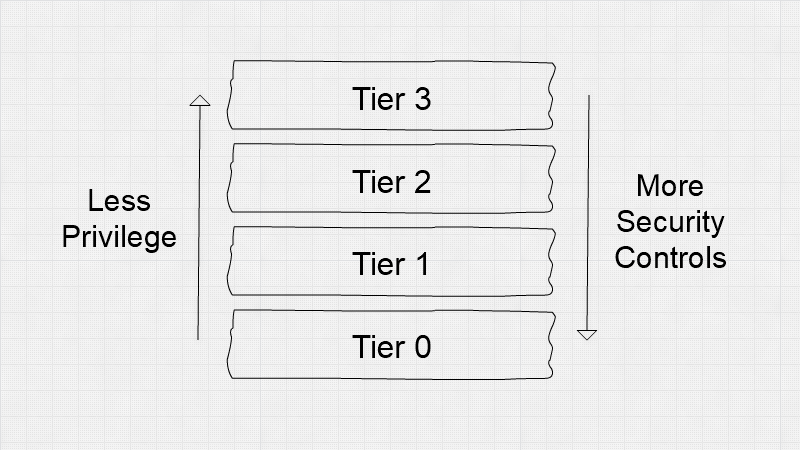
Figure 1: Tiers and the flow of privilege and security controls
High-risk access
High-risk accesses include actions that can indicate a serious security compromise, but do also happen during normal use. They typically fall between tiers 0 and 2, including actions such as the creation of new administrators, changing or removing security controls, or making a set of data or service available to the public. As high-risk accesses may happen routinely, you should not apply the same extreme protections that you would with emergency accesses. Instead, you should focus on applying strong pragmatic controls.
For example, it should only be possible to perform high-risk accesses using privileged access workstations, just in time administration, and just enough administration. This reduces the burden placed on your administrators, while still significantly reducing the risk that an attacker gains the ability to perform high-risk accesses.
Applying mitigations
Once the different administration tiers have been defined, you can apply appropriate security mitigations. As the tiers increase, the level of privilege decreases. But, sufficient protections still need to be in place. Our risk management guidance has more details.
When accessing administration interfaces, make sure you avoid the browse up anti-pattern. For example, avoid administering a tier 1 component from a tier 2 system. See 1 - Gain trust in your management devices.
Evolution of a system
As a system matures throughout its development life cycle, so should the practices used to perform system administration. The impact of compromise on an early stage start up is likely to be lower than on an established service that is relied upon by lots of users.
In the start up phase you may allow engineers to hold a high level of privilege from their development devices. However, as your service matures, you should re-evaluate the risks.
Consciously forgoing investment in security is a form of technical debt. Be aware though, just like normal technical debt, security can be more expensive to retro fit than it would have been to build-in earlier.
Insider threat
It’s possible that a well-meaning system administrator could just make a mistake. It's also possible that an administrator could go rogue, and abuse their access with malicious intent.
Ultimately, we need to trust system administrators. But, there are processes and guard rails that we can put in place to help prevent or deter worst-case scenarios from happening.
- Consider the visual cues and user interface elements that inform and support the system administrator. It's often easy to accidentally type an administration command in the wrong window.
- Put in place policies and procedures, so that your administrators understand what is, and is not acceptable.
- Investing in privileged access management makes it more difficult for a single person to make a mistake, or carry out a malicious action alone.
- Investing in logging and auditing acts as a deterrent for a malicious insider who may fear detection and the subsequent retribution.
For more information on this topic, please see our guidance on Technical Approaches to Insider Risk Management (due to be published shortly).
Other measures, such as security vetting, can also help. However, this guidance only focuses on the cyber security aspects of system administration.
Implementation guidance
- Identify and assess the risks your administration interfaces. Completing this activity will help you understand your system administration risks, and inform your administration strategy.
- Identify your administration tiers. Using your risk assessment, consider categorising your administration interfaces into tiers. This will help you apply pragmatic defences in your administration strategy.
- Define an administration strategy. Over time, your strategy should mature with the growth of your service.
- Implement your administration strategy. Apply technical controls that protect your administration interfaces, and implement least privilege. Be careful though, security controls can come at a cost. Don't make the jobs of your system administrators unnecessarily difficult. Strike a balance between managing the risk and enabling system administration.
- Evolve and refine your strategy. Use logging data and work with the system administrators to get feedback. Continually refine and improve the process. If something isn't working well, change it. Your administrators will thank you for it.
- Support your administrators. Work with your administrators to set a policy, and be transparent with it. Help and support administrators to do the right thing, rather than policing them.
Example Scenario A - Small Company
Small company uses SSH to connect to a front end web server, that hosts an information-only website.
In this scenario, the impact of compromise is restricted. It would allow an attacker to gain control of a front end web server which could lead to a loss of reputation.
Being a small company, they don’t have many staff members to separate into different tiers. However, they appreciate the benefit that this model brings with it, and so decide to create different tiered accounts for different functions.
The administrator that maintains the web server has two accounts created for them. One of these is defined as a Tier 0 account and the other is Tier 2. The administrator will use their Tier 2 account to edit the content on the web server. The Tier 0 account will only be used to delegate access to other administrators and also in emergency situations like disaster recovery.
The company has also defined a process to mandate that employees pass their probation period before being given administrator access. This ensures that a level of trust can be gained in the administrators before they are given access to systems.
Example Scenario B - Large Company
A Critical National Infrastructure company uses a thick client to control a valve in their OT environment.
In this scenario, the impact of the administration interfaces being compromised is critical as the system provides an essential service to citizens.
The company takes the four tier model above and applies it to all of its systems and administrators. It defines this in a policy so that employees can understand where they fit into the model and understand the role they play in the administration of systems.
Controlling a valve through a thick client has been designated as a Tier 3 activity within the policy. This is because the thick client itself sanitises any input such that the operator can only input safe values. Further, there are physical protections in place on the valve itself, which protect it in the event of a faulty thick client.
Administrators in this company have to undertake a mandatory training package so that they understand what their actions will do. This also acts as a deterrent to insider threat as administrators will not be able to plead ignorance.
Related references
- https://docs.microsoft.com/en-us/windows-server/identity/securing-privileged-access/securing-privileged-access-reference-material
- https://www.ncsc.gov.uk/collection/risk-management-collection
- https://www.ncsc.gov.uk/collection/principles-for-secure-paws
- https://www.ncsc.gov.uk/whitepaper/security-architecture-anti-patterns#section_4