Incident management
Page 5 of 7
Develop: Technical response capabilities

A successful technical response requires experienced and skilled individuals, as well as tools, specific network settings and access to data.
GDPR - supplying data to third parties
If data is provided to suppliers, GDPR requires that data controller ownership must be considered, as well as their capabilities.
Making essential information available
Network information
Having a clear understanding of your network is important for all response stages. It can reduce the discovery phase of a technical investigation from days to hours. It can also ensure successful containment and remediation actions are taken.
Network diagrams and supporting information should be available to show at least:
- Internet gateways
- IP address ranges and any separate VLANs
- remote access
- key systems (file servers, platforms, domain controllers, webservers)
- physical locations of servers
You should also document all security devices and software which could be useful during incident response.
Evidence and log availability
Any incident will require at least some basic data for triage and analysis.
Keep in mind that evidence can be just as important for proving something didn't occur, as proving that it did.
Types of evidence and logs
When considering what and how to go about logging, you should refer to good practice guidance and gather input from any external security providers. The NCSC's Introduction to logging is a good place to start your research.
You should also explore a number of incident scenarios, so that you know what data may be required in order to investigate such events.
Typical log and evidence categories should include:
- External network communications:
- Network traffic – metadata and packet capture (firewalls, IDS/IPS, proxies, DHCP, DNS)
- Emails - email logs, full email files, audit logs for the email systems
- Authentication and access:
- Account activity - domain controller and active directory logs
- Remote logins - as above plus potentially RDP, VPN and similar
- (other) Internal network activity:
- Local system activity - event logs, antivirus logs, any other host security software logs, and full images or memory dumps of the systems
- Web facing systems: Web logs and potentially similar host logs to above
- Other systems and specialist software may also need to be considered:
- information storage (document management systems and databases)
- financial systems
- operational technology systems – you should consider what logs and evidence exist for these
- cloud service specific logs
Asset and configuration information
In addition to these logs and evidence sources, you should also document your IT assets and configurations.
This information is particularly useful during incident response as it will help you to understand the 'where' and 'what' of the assets which are affected and assess the severity of the incident.
Log management and evidence capture
The NCSC's Introduction to logging provides greater detail on how logs can be organised and retained. However, we outline below a minimum and enhanced approach to logging and evidence capture.
The minimum:
- Document what log and data sources are available, to save valuable time during an incident
- Know how to access and retrieve logs for analysis, and who can do this
- Check that the logs are easily searchable - for example, can you search for a specific IP in firewall logs over the last 2 months?
- Ideally, retain logs for at least 3 months – longer if possible - and ensure archived logs can still be extracted
- Be able to provide access to physical machines. If full disk encryption is used, ensure decryption keys can be obtained and data decrypted.
To enhance evidence and logging for investigations:
- Ensure all evidence or log sources are synced to the same time server and timezone (this can help immensely in correlating events)
- Train staff on the basics of capturing memory and disk images if appropriate
- Ensure all logs have the relevant fields, or related logs are available to correlate - for example there may be a need to correlate DHCP logs with firewall logs in some setups
- Ability to retrieve logs in plain text format for analysis by other parties if required
Additional measures to improve evidence capture and log availability:
- Stream logs to a central location and system to enable rapid correlation and analysis (such as SIEM tool or SOC). This may also include local event logs from hosts.
- Retain full packet capture (for a shorter time)
Systems or data in the cloud:
Cloud / hosting providers may not turn on, or allow admin access to all logging by default.
Work with cloud providers to ensure you have access to relevant data, when required (either directly or via their staff).
Log testing
It's essential that you review and test log availability and extraction.
Many investigations have been hindered due to lack of log data. Often, this is data that the organisation believed they had, but hadn't verified.
Technical response
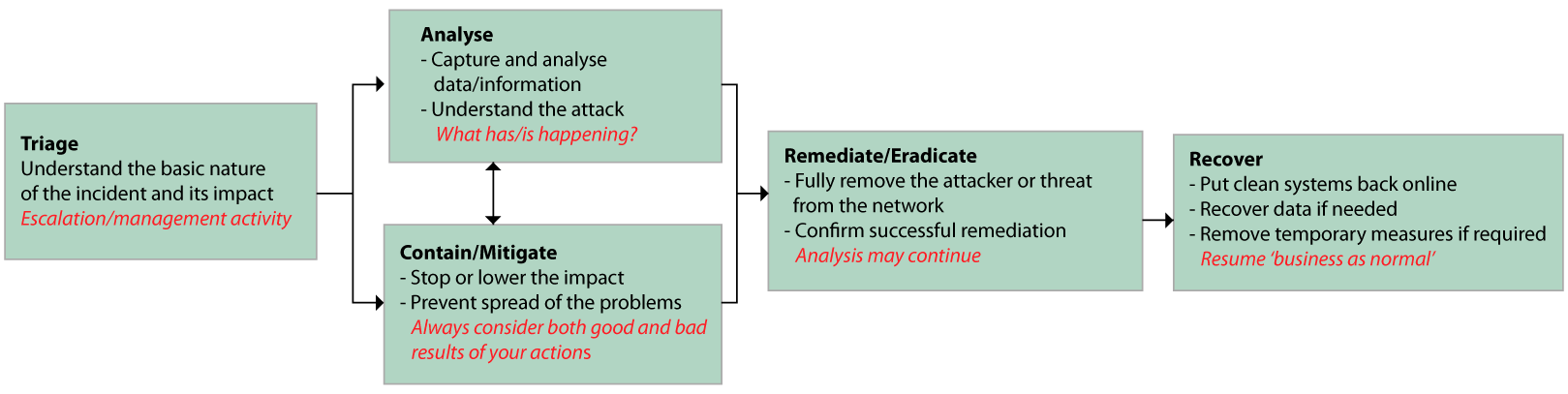
The technical response typically consists of the triage, containment, analysis, remediation and recovery stages. These stages may include non-technical elements such as media handling or legal considerations. Note that team skills and experience are just as important as technology to a successful response.
The stages of technical response are shown in the diagram below. A fuller diagram showing other non-technical elements is provided in the Cyber Incident Response Process section.
A fluid process
The stages within the technical response process cycle and overlap. For example, some less critical analysis may take place during the remediation phase. Similarly, containment and mitigation actions may be taken throughout the initial analysis stages.
The capabilities of your suppliers
If you rely on suppliers (such as managed infrastructure or hosting providers) to undertake technical actions, you should consider their capabilities, availability and the Service Level Agreements (SLAs) in place with them.

To be successful, actions often need to be synchronised across the entire IT estate, so that infections can be eradicated in a single pass.
Triage
Triage involves the classification of the incident type and severity, so that subsequent actions can be prioritised. It is primarily guided by clear set of incident type definitions, and the observed impact of the incident. A more detailed treatment of the the classification process, can be found in the section on Developing Cyber Incident Processes.
This stage is heavily reliant on the availability of evidence and data along with the ability to analyse it.

Don't overreact
During containment it is important to think through the potential repercussions of any actions you might take to deal with the incident.
Overreacting can cause more damage than the incident itself. And in the case of targeted attacks, the attacker could react or bury themselves more deeply in your network.
In some cases, it may be better to monitor and analyse further before you take action. You will need to assess this on a case-by-case basis.
The key to knowing the right action to take is to create your own organisation-specific guidance and exercise different scenarios. This will help you determine the best actions for your organisation and IT set-up, as well as to building staff experience. When the moment comes, you will thus be better prepared and more likely to take the most appropriate action.
Analysis
Typically, the priority at this stage is to learn enough to contain, and ultimately remediate an attack. However, to do this, you may also need to understand both the conditions which enabled the attack and develop a detailed picture of the attacker's actions while they had access to your systems.
As you discover new information, you may need to cycle between this stage and your containment / mitigation work.
In order to perform some basic triage and analysis in-house, the following steps may be useful:
- Engaging with users to understand what they observed or did (e.g. clicking a link)
- Analysis of logs such as Active Directory, remote access and email to understand the activity. In some cases, this may involve basic searching of network traffic logs (e.g. firewall)
- Use of open source threat intelligence (e.g. blogs and open source sandboxes).
Many incidents require more complex analysis. This will include such things as:
- Full host (disk/mobile/server) forensics
- Network traffic and log analysis (often very high volumes so can require specialist tools)
- Advanced malware analysis
- Correlation of many different event, log and data sources
This type of analysis is often outsourced to specialists. However, for organisations which are heavily targeted, growing a more advanced capability in-house can be beneficial and reduce costs. It also means the people doing the analysis will already have an in-depth understanding of your networks.
Analysis may continue during the remediation / eradication stage in some cases. For example, when enough of the threat is understood to fully remove it from the network, but more analysis is needed to establish exactly what happened during the attack, so that legal, regulatory, and other external stakeholders can be informed.
Remediation / eradication
In this stage, the threat is fully removed from your network.
Containment and Remediation, while different, often require similar capabilities:
- Isolation of systems (can include critical systems, virtual machines, websites)
- Reset of credentials and ability to block or lockdown remote access
- Blocking in/outbound traffic and emails
- Removing malicious files (clean or rebuild machines, clean user profiles, scan with AV, deploy a script).
Remediation requires careful planning.
More advanced capabilities include:
- The ability to carry out actions in a timely manner, including out of hours (consider supplier SLAs and staff availability / on call if required)
- Synchronisation of a range of actions across the estate, including different timezones and countries (particularly for remediation)
- More complex actions such as:
- Resetting domain admin and service accounts, and estate wide resets
- Remotely isolate or quarantine machines or parts of the network
- Remotely block or remove malicious files and/or processes
- Block or alert on specific patterns (e.g. traffic patterns)
- Monitoring of network and host activity to confirm actions have been successful.
Confirm remediation success
You should always confirm that remediation has been successful before moving to recovery.
It is vital that staff are available who can authorise critical decisions, such as taking a customer database or website offline.
The people required to actually perform the action must be aware of who they need to contact, how to contact them, and when. This applies to suppliers as well as in-house staff.
Continuity planning should take into account outages and down times as part of cyber incident and response. This should be linked to disaster recovery planning.
There may also be non-technical actions to deal with at this stage. This could include the likes of media handling, customer support and regulatory or legal duties. For more detail, see the process page.
Backups must be confirmed as clean
Only clean data should be copied back onto clean systems and networks.
Tip: Backing up just 'data' (i.e. work documents rather than system files) will help prevent executable files (and therefore infections) hiding in your back ups.
Recovery
At this point, there is a high level of confidence that the attacker has been removed. The primary goal at this point is a return to 'business as usual.' This means getting the network back to a clean state, and finalising things like regulator, media and customer handling.
With clean systems back online, temporary blocks and other measures can be removed, unless you see value in keeping them on a more permanent basis.
Considerations for technical recovery
In the worst case scenario, where data or systems are damaged (e.g. encrypted by ransomware) or lost, backups should be available to recover from and/or spare devices and systems made available.
To aid the recovery process, you should:
- Have offline / segregated backups of your data as online backups could be affected.
- Retain backups for a period of time, rather than just have a single rolling backup as this does not provide much protection if an infection/damage isn't noticed before the backup is overwritten.
- Consider how long it may be before something is detected and ensure your backups are kept for longer – a month at least.
- Consider making backups of system configurations (e.g. specialist systems)
- Review the availability of spare devices. You may need to replace or fully rebuild devices if the infection is unknown and/or hard to remove.