Application development
Page 9 of 16
Secure iOS application development
How to securely develop an iOS application, including how to store, handle or process sensitive data and the recommended network configuration.
1.1 Datastore hardening
By default, third party App Store applications on iOS will be able to ask for access the users’ Calendars, Contacts, Camera, Location, Photos, and Social Networking accounts. On iOS these accesses are prompted on first use in each application, such that the user can accept or decline the permission. You can configure Restrictions settings on the device to prevent this functionality being used. Within an organisation, this is typically configured and deployed using an MDM-based solution. More information about MDM managed devices can be found within NCSC’s end user device guidance.
Nevertheless, there remains the possibility that the user could accept these access permissions and the application could access data in these stores. If there's a risk of an untrusted app accessing this data, then you should not store sensitive information within these datastores. A third party application may be able to store this information more securely than the default stores.
As the potential exists that the device may be compromised, on-device encryption routines cannot be solely relied on to protect sensitive information. Sensitive information should not be stored on a device for longer than it is required. Where sensitive information is stored on the device, even if temporarily, the following steps should be taken:
- Sensitive credentials should be sufficiently encrypted before being stored within the keychain using the appropriate keychain class described in section 1.3 below.
- The appropriate data protection class should still be used.
- Sensitive data stored by the application should be marked with the 'do not back up' attribute to ensure that specified files are not included within an iTunes or iCloud backup.
1.2 Network protection
The diagram below, taken from the NCSC EUD Security Guidance for iOS, illustrates the recommended network configuration for iOS devices which handle sensitive information. In summary, a VPN is used to bring device traffic back to the enterprise. Access to internal services is brokered through a reverse proxy server, which protects the internal network from attack.
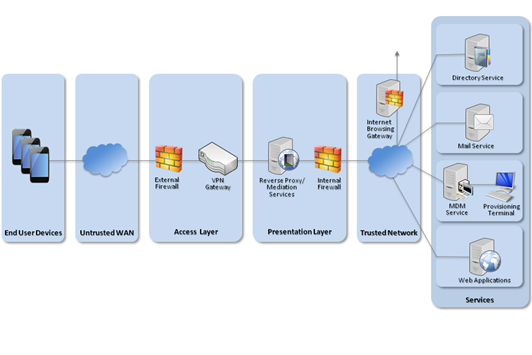
To prevent the application from accessing sensitive internal resources, it is important that the reverse proxy server authenticates any requests from devices. This means that applications on the device, which are trusted to access sensitive data, should provide authentication with each request so that the reverse proxy can validate the request. Stored credentials should be private to only the trusted applications accessing those resources.
Internet requests from the application should be routed via the standard corporate Internet gateway, to permit traffic inspection.
1.3 Secure application development recommendations
The following section contains recommendations that an iOS application should conform to in order to store, handle or process sensitive data. Many of these recommendations are general good-practice behaviours for applications on iOS, and a number of documented code snippets and examples are available on Apple’s developer portal.
Secure data storage
In order to store sensitive data in a secure manner, iOS applications should conform to the following:
- Applications should use the iOS Keychain APIs to store credentials.
- Applications should use the iOS Data Protection API to store sensitive file system data.
- Applications should store as much data as possible using data protection classes A and B.
- Private keys should be marked as non-migratory.
- Where a credential is required to authenticate to a remote service that provides access to sensitive data, applications must store this credential in Class A or C keychain protection classes, or prompt for the credential on application launch.
- The
kSecAttrAccessibleWhenPasscodeSetThisDeviceOnlyattribute could also be used to further harden local credential storage to prevent any synchronisation with the iCloud keychain. This acts the same askSecAttrAccessibleWhenUnlocked.However, it is only available when devices have a passcode set and is protected via hardware-backed storage mechanisms. - Developers should be careful when storing information in the cloud. iCloud or other Internet-based storage solutions should not be used to store sensitive information (e.g. credentials). The application must work as expected if iCloud is disabled on the device.
- Certain keychain APIs can be used to further constrain specific keychain items. To only allow access for Touch ID only, use
kSecAccessControlTouchIDCurrentSet. A similar effect can be achieved using the secure enclave hardware-based key manager (kSecAttrTokenIDSecureEnclave). These attributes should be investigated to ensure the appropriate level of protection is implemented during development of a feature. More information about the secure enclave can be found within the API documentation. - On iOS version 9 and later, it is also possible to prevent a physical attacker from enrolling their own fingerprint on the device. This can be performed by reading the
evaluatedPolicyDomainStatevariable to determine if TouchID enrolment changes have occurred since last usage. - We recommend that the application performs a wipe of its keychain data on first install (not upgrade). This can prevent keychain data being reused if the device is, for example, sold at a later stage and a full device wipe has not been performed.
- Mask off all sensitive data on screen when the application receives notifications that will enter the background state using
applicationWillResignActiveandapplicationDidEnterBackground. This is to ensure that the screenshot taken of the application does not contain sensitive information. - Network communication can also be cached within certain databases within the application sandbox. Ensure any network-level caching is not performed when sensitive data is being retrieved from the server side. Certain iOS APIs perform caching of network traffic (including plaintext data sent via HTTPS) on the device. If an attacker is able to gain access to the contents of the sandbox, they may be able to recover this data. Therefore, caching related APIs should be reviewed to ensure that sensitive data is not stored. More information can be found within Apple’s cache policy documentation.
Server side controls
Applications which store credentials must have robust server-side control procedures in place in order to revoke credentials should the device or data be compromised.
Pasteboard and debugging data
The application must manage the pasteboard effectively by doing one (or more) of the following:
- Clear the pasteboard when the application exits or loses focus (crashes may still result in data leakage).
- Implement a private pasteboard within your application - do not use the system pasteboard.
- Encrypt the pasteboard with a key stored in the Developer’s keychain. This also allows pasting between the same developer’s applications.
- Exclude sensitive information from the Universal Clipboard (Handoff Feature). This can be performed by using the
setItems(_:options:)method with thelocalOnlyoption within theUIPasteboardclass.
The application must ensure that debugging output has been removed and sensitive information prevented from appearing within the device log files.
- Logging APIs such as ‘NSLog’, ‘printf’, ‘NSAssert’, etc. should be reviewed and removed from production builds if sensitive information is being logged using these APIs.
- The application should detect and notify a user when screen capture is performed on iOS 11 and take appropriate action. For example, the application could display a warning and/or exit to prevent screen capture of sensitive data. More information about this feature can be found within the API documentation.
Secure data transmission
In order to transmit sensitive data securely, iOS applications should conform to the following:
- All off-device communications must take place over a mutually-authenticated, cryptographically-protected connection. For example:
- the assured IPsec VPN to the corporate network
- Secure Chorus for secure real-time media streaming such as secure voice
- Transport Layer Security (TLS) with certificate pinning to a known endpoint to a service within the corporate network; more information on TLS can be found within NCSC’s TLS documentation
- The application must not allow its sensitive data to be opened in other applications on the device (e.g. through Open In) unless that application is on an appropriate enterprise-managed allow list.
- Any security-critical settings (such as server addresses and certificates) must be defined at build time or be enterprise-managed. The user must not be able to alter these settings.
- If cloud services, such as iCloud, are used by the app to store information, this should be protected using the appropriate encryption mechanisms both from a network transmission perspective and data storage perspective.
- Applications should make use of App Transport Security (ATS) and should not disable this feature or add domains to the exception allow list. Applications should aim to keep perfect forward secrecy (PFS) enabled and not reduce the minimum TLS version supported.
- Ensure that
kSecAttrSynchronizableis not set for security-sensitive keychain items (as they will be included in an iCloud keychain backup, if this functionality is enabled).
Note that at present there is no API on iOS to check the status of the VPN. To securely check the status of the VPN, the internal service with which the application is communicating must be authenticated. The recommended way of performing this authentication is TLS with a pinned certificate. If mutual authentication is required to the internal service, mutual TLS with pinned certificates should be used.
Application security
To hinder the exploitation of any potential memory corruption vulnerabilities, the following recommendations should be followed:
- The application should be compiled using the latest supported security flags.
- The binary should be compiled with the Process Independent Executable (PIE) flag set.
- The application should make use of Automatic Reference Counting (ARC) – which is enabled by default.
- The application should not use private APIs.
Client side security
The following recommendations should be followed to improve the security of the client:
- Secure coding practices should be followed to protect against input injection attacks. More information can be found in Apple’s secure coding guide.
- If the application uses Web Views (
UIWebView,WKWebVieworFSafariViewController) it should disable features which are not required by content loaded into the WebView (for example JavaScript or local file access). This will lead to a reduction in attack surface and help protect this area of the application. - If content is being loaded locally into a Web View, users should be prevented from changing the filename or path which is loaded and they should not be able to edit the loaded file.
Security requirements
The following list includes some other behaviours which can increase the overall security of an application.
- Applications should store as much data as possible in data protection classes A and B (as described at the top of this page).
- Applications should sanitise in-memory buffers after use, where possible, if the data is no longer required for operation (for example a temporary password or PIN buffer).
- Applications should not upgrade the storage class of an existing file from Class D to a higher class. Instead, create a new file and copy the data across before deleting the original file. This ensures that the file is wrapped with a new key that may not be forensically recovered from Class D analysis.
- Applications should minimise the amount of data stored on the device. Retrieve data from the server when needed, over a secure connection, and erase it when it is no longer required.
- Applications that require authentication when launched should also request this authentication credential when returning back into the foreground after previously being backgrounded by a user, allowing for a small grace period.