Application development
Page 4 of 16
Secure Android application development
How to securely develop an Android application, including how to store, handle or process sensitive data and the recommended network configuration.
1.1 Datastore hardening
Android, by default, provides each application on a device with access to a private directory to store its files. This protection is implemented using Linux user and group permissions. The security model is further enforced by applying Security-Enhanced Linux mandatory access control policies and leveraging a seccomp system call filter.
Android, as of version 7.0, on devices with file-based encryption (FBE), provides two storage locations on devices with FBE and Direct Boot. On FBE-enabled devices, developers should only store sensitive data in the Credential Encrypted (CE) storage.
Applications are able to access other areas of the device, such as contacts and SMS, by requesting permission from the user at runtime. The user can choose to permit the application access to areas such as the device’s calendar and phonebook, as well as features such as making phone calls or reading the current location. Once permitted, the application may use these features without further interaction from the user.
Despite protection offered by Android's sandboxing, it remains the responsibility of the application to store its data securely and to not undermine any protections that are in place by (for instance):
- writing data to publicly readable locations such as the external storage
- handling intents that can be called by any other application on the same device
- creating files with world readable/writable permissions
Remember that a process running on the device with sufficient permissions, will always be able to read and write any data in any application’s sandbox. We strongly recommended that applications holding sensitive data should build upon the sandbox with more secure functionality by (for example) leveraging the hardware-backed KeyStore.
Ultimately, it is not possible to guarantee the security of data on a device. You should assume that if a user continues to use a device after it has been compromised, the malware will be able to access the data. Android provides an API called SafetyNet for assessing the health and safety of the device. This API examines both hardware and software information about the device, to help determine if it has been tampered with or otherwise modified. We recommend that application developers use the API, then send the signed SafetyNet API results to their own servers to be validated, rather than on the device. SafetyNet should be used as a means to gain confidence about the integrity of the device, but it is not guaranteed to detect a compromise.
1.2 Network protection
The diagram below illustrates the recommended network configuration for Android devices which handle sensitive information. In summary, a VPN is used to bring device traffic back to the enterprise. Access to internal services is brokered through a reverse proxy server, which protects the internal network from attack.
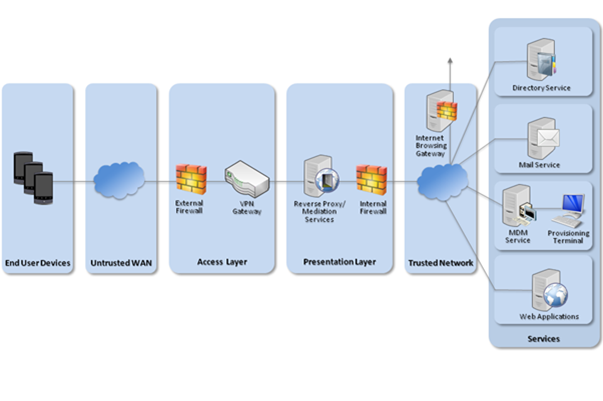
To prevent the application from accessing sensitive internal resources, it is important that the reverse proxy server authenticates any requests from devices. This means that applications on the device which are trusted to access sensitive data must provide authentication with each request so that the reverse proxy can validate the request. Stored credentials must be private to only the trusted applications accessing those resources.
Internet requests from the application should be routed via the standard corporate internet gateway, to permit traffic inspection.
1.3 Secure application development
The following section contains recommendations that an Android application should conform to in order to store, handle or process sensitive data. Many of these recommendations are general good-practice behaviours for applications on Android. A number of documented code snippets and examples are available on the Android developer portal.
Secure data storage
In order to store sensitive data in a secure manner, Android applications should conform to the following:
- Applications should minimise the amount of data stored on the device. When needed, data should be retrieved from the server over a secure connection, and erased when it is no longer required.
- Sensitive information, if required, should only be stored in the hardware-backed KeyStore.
- The device’s external storage (for example the SD card) should not be used by the application to store sensitive data.
Server-side controls
Applications which store credentials should have robust server-side control procedures in place to revoke the credential, should the device or data be compromised.
Secure data transmission
In order to transmit sensitive data securely, Android applications should conform to the following:
- All off-device communications handling sensitive data should take place over a mutually-authenticated, cryptographically protected, connection.
- For TLS connections, the application should perform certificate pinning to a known endpoint. This process should leverage the Network Security Configuration. For more information refer to the NCSC’s TLS documentation.
- Certificates used by the application should be stored on the device using the Android KeyStore provider.
Note that at present there is no API on Android to check the status of the VPN. To securely check the status of the VPN, the internal service with which the application is communicating must be authenticated. The recommended way of performing this authentication is TLS with a pinned certificate. If mutual authentication is required to the internal service, mutual TLS with pinned certificates should be used.
Application security
- The application should be compiled using the latest supported compiler security flags.
- The application should not be compiled with the debug flag enabled.
- The application should not use any private APIs.
- The application should be compiled in release mode with all debug information stripped from the binaries.
- If Android Studio is used, it should be configured to shrink and optimise Java code.
Security recommendations
The behaviours listed below can increase the overall security of an application.
- Any data that is deemed necessary to store on the device should be encrypted either with keys that are not stored on the device, or that are stored in the Android KeyStore. Furthermore, key attestation should be used when hardware-backed key storage is available.
- Where possible, applications should sanitise in-memory buffers of sensitive data after use (if the data is no longer required for operation).
- Applications that require authentication on application launch should also request this authentication credential when returning back to the foreground after previously being backgrounded by a user, allowing for a small grace period.
- As the standard Android clipboard is shared between all applications on the device, do not not use it when accessing sensitive data. A private clipboard can be implemented if required by the application.
- The application should disable both manual and automatic screenshots within activities that display sensitive data by setting secure flags of the window within the application.
- Applications that use a shared UID will share the same sandbox. This means that if one application was compromised, all data in any application with a shared UID would also be compromised. Developers should share functionality between applications using intents, restricted by permissions.
- Intents created for IPC between trusted applications should use signature permissions to restrict access by other applications on the device.
- Applications that use Web Views should limit the features and capabilities to the minimum functionality required.
- JavaScript and local file access should be disabled unless specifically required.
- Caching should be disabled to prevent unnecessary exposure of sensitive data.
- The application should ensure that debugging output has been removed and sensitive information prevented from appearing within the device log files.