New Sandworm malware Cyclops Blink replaces VPNFilter
The Sandworm actor has replaced the exposed VPNFilter malware with a new more advanced framework.

Background
The UK National Cyber Security Centre (NCSC), the Cybersecurity and Infrastructure Security Agency (CISA), the National Security Agency (NSA) and the Federal Bureau of Investigation (FBI) in the US have identified that the actor known as Sandworm or Voodoo Bear is using a new malware, referred to here as Cyclops Blink. The NCSC, CISA, FBI and NSA have previously attributed the Sandworm actor to the Russian GRU’s Main Centre for Special Technologies GTsST.
The malicious cyber activity below has previously been attributed to Sandworm:
- The BlackEnergy disruption of Ukrainian electricity in 2015
- Industroyer in 2016
- NotPetya in 2017
- Attacks against the Winter Olympics and Paralympics in 2018
- A series of disruptive attacks against Georgia in 2019
Cyclops Blink appears to be a replacement framework for the VPNFilter malware exposed in 2018, which exploited network devices, primarily small office/home office (SOHO) routers, and network attached storage (NAS) devices.
This advisory summarises the VPNFilter malware it replaces, and provides more detail on Cyclops Blink, as well as the associated tactics, techniques and procedures (TTPs) used by Sandworm. An NCSC malware analysis report on Cyclops Blink is also available and can be read in parallel.
It also points to mitigation measures to help organisations that may be affected by this malware.
VPNFilter
First exposed in 2018
A series of articles published by Cisco Talos in 2018 describes VPNFilter and its modules in detail. VPNFilter was deployed in stages, with most functionality in the third-stage modules. These modules enabled traffic manipulation, destruction of the infected host device, and likely enabled downstream devices to be exploited. They also allowed monitoring of Modbus SCADA protocols, which appears to be an ongoing requirement for Sandworm, as also seen in their previous attacks against ICS networks.
VPNFilter targeting was widespread and appeared indiscriminate, with some exceptions: Cisco Talos reported an increase of victims in Ukraine in May 2018. Sandworm also deployed VPNFilter against targets in the Republic of Korea before the 2018 Winter Olympics.
In May 2018 Cisco Talos published the blog that exposed VPNFilter, and the US Department of Justice linked the activity to Sandworm, and announced its disruption of the botnet.
Activity since its exposure
A Trendmicro blog in January 2021 detailed residual VPNFilter infections and provided data showing a reduction in requests to a known C2 domain. Since the disruption in May 2018, Sandworm has shown limited interest in existing VPNFilter footholds, instead preferring to retool.
Cyclops Blink
Active since 2019
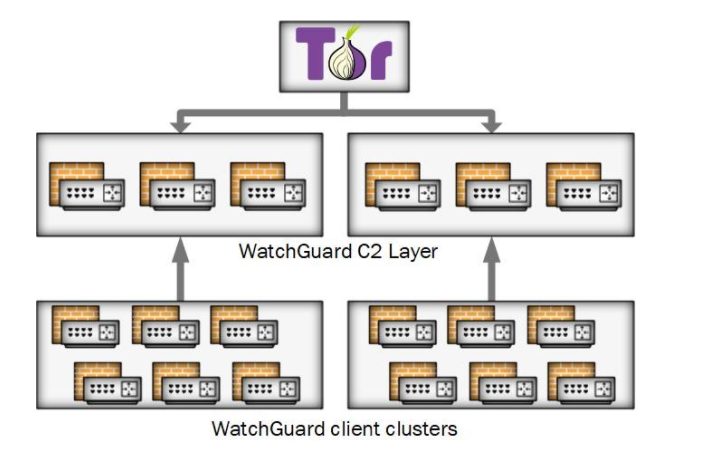
The NCSC, CISA, FBI and NSA, along with industry partners, have now identified a large-scale modular malware framework which is affecting network devices. The new malware is referred to here as Cyclops Blink and has been deployed since at least June 2019, fourteen months after VPNFilter was disrupted. In common with VPNFilter, Cyclops Blink deployment also appears indiscriminate and widespread.
The actor has so far primarily deployed Cyclops Blink to WatchGuard devices, but it is likely that Sandworm would be capable of compiling the malware for other architectures and firmware.
Note:
Note that only WatchGuard devices that were reconfigured from the manufacturer default settings to open remote management interfaces to external access could be infected
Malware overview
The malware itself is sophisticated and modular with basic core functionality to beacon (T1132.002) device information back to a server and enable files to be downloaded and executed. There is also functionality to add new modules while the malware is running, which allows Sandworm to implement additional capability as required.
The NCSC has published a malware analysis report on Cyclops Blink which provides more detail about the malware.
Post exploitation
Post exploitation, Cyclops Blink is generally deployed as part of a firmware ‘update’ (T1542.001). This achieves persistence when the device is rebooted and makes remediation harder.
Mitigation
Cyclops Blink persists on reboot and throughout the legitimate firmware update process. Affected organisations should therefore take steps to remove the malware.
WatchGuard has worked closely with the FBI, CISA and the NCSC, and has provided tooling and guidance to enable detection and removal of Cyclops Blink on WatchGuard devices through a non-standard upgrade process. Device owners should follow each step in these instructions to ensure that devices are patched to the latest version and that any infection is removed.
The WatchGuard tooling and guidance is available at: https://detection.watchguard.com/
In addition:
- If your device is identified as infected with Cyclops Blink, you should assume that any passwords present on the device have been compromised and replace them (see NCSC password guidance for organisations).
- You should ensure that the management interface of network devices is not exposed to the internet.
In addition:
- If your device is identified as infected with Cyclops Blink, you should assume that any passwords present on the device have been compromised and replace them (see the NCSC's password guidance for organisations)
- You should ensure that the management interface of network devices is not exposed to the internet
Indicators of compromise
Please refer to the accompanying Cyclops Blink malware analysis report for indicators of compromise which may help to detect this activity.
MITRE ATT&CK®
This advisory has been compiled with respect to the MITRE ATT&CK® framework, a globally accessible knowledge base of adversary tactics and techniques based on real-world observations.
| Tactic | Technique | Procedure |
|---|---|---|
| Initial Access | T1133 | External Remote Services |
| Execution | T1059.004 | Command and Scripting Interpreter: Unix Shell |
| Persistence | T1542.001 | Pre-OS Boot: System Firmware |
| T1037.004 | Boot or Logon Initialisation Scripts: RC Scripts | |
| Defence Evasion | T1562.004 | Impair Defenses: Disable or Modify System Firewall |
| T1036.005 | Masquerading: Match Legitimate Name or Location | |
| Discovery | T1082 | System Information Discovery |
| Command and Control | T1090 | Proxy |
| T1132.002 | Data Encoding: Non-Standard Encoding | |
| T1008 | Fallback Channels | |
| T1071.001 | Application Layer Protocol: Web Protocols | |
| T1573.002 | Encrypted Channel: Asymmetric Cryptography | |
| T1571 | Non-Standard Port The list of port numbers used by Cyclops Blink includes non-standard ports not typically associated with HTTP or HTTPS traffic | |
| Exfiltration | T1041 | Exfiltration Over C2 Channel Cyclops Blink can upload files to a C2 server |
Conclusion
A Cyclops Blink infection does not mean that an organisation is the primary target, but it may be selected to be, or its machines could be used to conduct attacks.
Organisations are advised to follow the mitigation advice in this advisory and to refer to indicators of compromise (not exhaustive) in the Cyclops Blink malware analysis report to detect possible activity on networks.
UK organisations affected by the activity outlined in this advisory should report any compromises to the NCSC via our website.
Further guidance
A variety of mitigations will be of use in defending against the malware featured in this advisory:
-
Do not expose management interfaces of network devices to the internet
the management interface is a significant attack surface, so not exposing them reduces the risk. See NCSC guidance: Acquiring, managing and disposing of network devices
-
Protect your devices and networks by keeping them up to date
use the latest supported versions, apply security patches promptly, use anti-virus and scan regularly to guard against known malware threats. See NCSC guidance: Mitigating malware
-
Use multi-factor authentication to reduce the impact of password compromises
see NCSC guidance: Multi-factor authentication for online services and Setting up 2-Step Verification (2SV)
-
Treat people as your first line of defence
tell staff how to report suspected phishing emails, and ensure they feel confident to do so. Investigate their reports promptly and thoroughly. Never punish users for clicking phishing links or opening attachments. See NCSC guidance: Phishing attacks: defending your organisation
-
Set up a security monitoring capability
so you are collecting the data needed to analyse network intrusions. See NCSC guidance: Introduction to logging for security purposes
-
Prevent and detect lateral movement in your organisation’s networks
see NCSC guidance: Preventing Lateral Movement
Downloads
- 314.2 KB
Joint Sandworm advisory
The Sandworm actor, which the UK and US have previously attributed to the Russian GRU, has replaced the exposed VPNFilter malware with a new more advanced framework.
- 441.15 KB
Cyclops Blink - Malware Analysis Report
A modular malware framework targeting SOHO devices, with accompanying IOCs, YARA and STIX files.
- Csv
- 5.89 KB
Cyclops Blink - Malware Analysis Report Indicators
- Txt
- 7.66 KB
Cyclops Blink - Malware Analysis Report YARA
- Json
- 281.31 KB
Cyclops Blink - Malware Analysis Report STIX