Reducing data exfiltration by malicious insiders
Advice and recommendations for mitigating this type of insider behaviour.

This guidance can help organisations to reduce the likelihood of data exfiltration by malicious insiders. It's aimed at staff responsible for delivering insider risk mitigation programmes, including technical leaders, business delivery owners, senior line managers, and staff working in HR, data protection and legal departments.
This guidance provides examples of the methods malicious insiders have used or could use to exfiltrate data, and suggests technical measures that can be used to:
- prevent data exfiltration
- enable monitoring
- carry out post-event audit
Note
Mitigations for data exfiltration should be one element within an overall framework of insider risk mitigation. This guidance assumes that organisations already have in place such a framework (such as NPSA's Insider Risk Mitigation Framework), and also procedures in place for managing incident response following data exfiltration (see NCSC's guidance on managing cyber incidents).
Introduction
Malicious insider activity is relatively rare, but can have a major impact on an organisation when it does occur. It is defined as when anyone who has legitimate access to your organisation's assets exploits their position for unauthorised purposes (so not just employees, but also contractors, partners and suppliers).
The majority of insider breaches are not malicious, but are a result of staff performing their daily roles which can be made harder than necessary due to restrictive security. For example, consider a member of staff who has written their passwords on a post-it note under their keyboard because they have to enter five long, complex passwords to access the required systems. For instances such as this, it is important to distinguish between staff who adopt insecure workarounds because security policies conflict with business requirements, and staff who are genuinely malicious insiders.
Your organisational risk mitigation decisions should be based upon achieving a balance between business delivery needs, policies and technical controls. Mitigations for data exfiltration should be understood by all employees, embedded in relevant policies, and supported by the organisation’s security culture.
Prevent, monitor, audit
The measures you take to prevent, monitor or retrospectively audit data exfiltration by malicious insiders can also reduce the risk of data breaches by your staff. The measures will also provide some protection against data exfiltration by external attackers who have penetrated the organisation’s network, or captured and exploited valid credentials.
Note that:
- You will need to interpret this guidance according to your organisation's own circumstances. This includes your use of trusted service providers, future technology developments, acquisitions, mergers and divestitures, and upgrades or modifications to existing technologies.
- You should already have appropriate governance of insider risk mitigation, and have carried out essential activities including identifying critical assets. Without these it is difficult for organisations to make informed decisions about balancing technical controls with business processes, which is necessary for continued productivity.
Technical measures that can prevent data exfiltration
The technical controls to mitigate the risk of data exfiltration is founded on 3 elements:
Technical controls
Technical controls to Prevent, Monitor and Audit need to be applicable across the organisation’s entire estate including BYOD, contractors and remote/home working where applicable. The rise in home working and Bring Your Own Device solutions provide many benefits to an organisation but also introduce a number of challenges for security, including risks of data exfiltration.
Technical controls for consideration include:
- implementation of rules within products, apps and services
- deny listing/allow listing (by URL, IP ranges, applications, protocols, bi/dual directional rules etc)
- preventing use of steganography applications
- preventing or controlling the use of translation sites
- endpoint/mobile device management
- mobile application management
- data loss prevention software (including content inspection)
- security incident event management (SIEM) solutions
- log management and analysis
- controlling use of external storage devices
- controlling for abuse of email
This flowchart highlights the decision making process that can be used to assess where technical controls can be implemented:
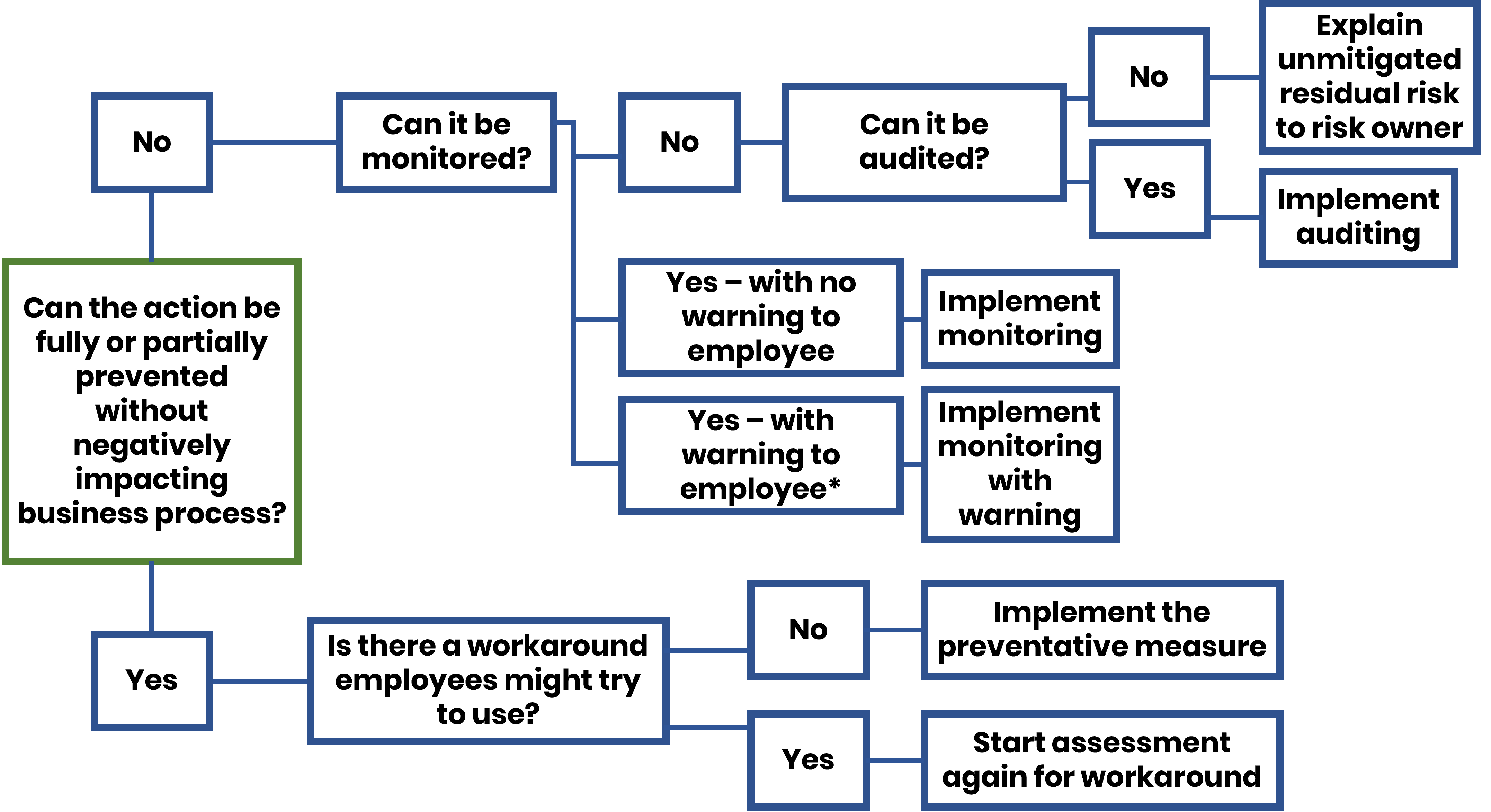
*When monitored actions give warning messages to users, the consequences of proceeding must be fully explained in a readily available Acceptable Use Policy.
The appropriate mitigation measures to take will vary according to the situation, as risks will be different for different users. For example, enhancing monitoring of employees in the 30 days before they leave and/or as soon as they have given notice, or when they are advised they are in scope of possible redundancy. In this case, ensure the recovery of official devices and closing of accounts when they leave, including consideration of BYOD solutions. It may be appropriate to conduct a rigorous post-departure audit of their activities on the network in the relevant period before their departure. In other situations, enhanced monitoring could be mandatory for the job role, or BYOD judged too high-risk for the activity.
Recommended mitigations for data exfiltration
Achieving an appropriate balance between risk mitigation, business efficiency and organisational/security cultures is a challenge for all organisations. It can only be achieved through a healthy discussion between technical leads, business delivery leads and risk owners. This must be conducted as part of an overall insider risk mitigation programme, with sound governance and clear understanding of the board’s appetite for risk. The following recommendations (which are not exhaustive) will help your organisation achieve the right balance:
- 1
Recommendation 1
Baseline what measures are already in place to Prevent, Monitor and Audit the common methods of data exfiltration, and assess the residual risk to the organisation’s critical information assets. Appendix A will help with this.
- 2
Recommendation 2
Ensure that best use is being made of existing tools before investing in new ones. Identify what can be improved, not just from a technical perspective, but also in terms of process (for example, implementing a thorough joiners/movers/leavers procedure). Using Appendix A can assist the business case for any new investment.
- 3
Recommendation 3
Recognise where existing security policies (such as enforcing arbitrary password complexity requirements) conflict with the ability of users to go about their day-to-day tasks. Work with staff to understand issues and co-create policy & processes to satisfy both security and usability.
- 4
Recommendation 4
Ensure that change management protocols are in place to check that neither technology changes nor business delivery developments (including organisational change) can take place without prior assessment of the security risks. This should specifically include any changes to your vulnerability to data exfiltration by malicious insiders.
- 5
Recommendation 5
Adopt a flexible approach to preventative measures, especially monitoring. Good practice guidance on employee monitoring is that it must be proportionate and locally lawful. It should not be conducted covertly or individually targeted. Therefore, with regard to data exfiltration prevention, the strictest controls should be applied to high risk users and to critical assets.
- 6
Recommendation 6
Give careful consideration to the proportionate protective measures around those who work part time for your organisation and part time for others including 'Need to Know' access only as required for their role. This may include senior people such as non-executive directors as well as consultants and contractors. If they have multiple accounts (including yours) on their devices, consider protective measures that prevent data leakage from your network to others.
This guidance has been collaboratively produced by NPSA, NCSC and SITIIE (Securing IT against Insiders Information Exchange).
Appendix A: Baseline assessment of exfiltration techniques
This table can be completed by organisations to prepare a baseline assessment of their critical assets, adding additional lines if necessary (and ignoring those that are not relevant). This process should be seen as part of the organisation’s overall security risk management process. Once completed, organisations should review relevant policies in case of necessary updates.
Columns 2 and 3 should normally be completed by technical leads to inform a subsequent conversation with business leads and risk owners (who would normally complete columns 4 and 5).
| 1 Method | 2 Current state (prevent/monitor/audit) | 3 Residual risk | 4 Technology to upgrade without impacting business delivery (and cost) | 5 Residual risk after upgrade |
|---|---|---|---|---|
| Obfuscation/Steganography | ||||
| Copy and paste | ||||
| Screen grab and paste | ||||
| Save data with new name | ||||
| Save data in different file format | ||||
| Save data with protective marking removed | ||||
| Translate | ||||
| Shrink file and embed in another document | ||||
| Steganography within .jpeg | ||||
| Use of private/medical/personal filenames | ||||
| Exfiltration | ||||
| Webmail | ||||
| External storage devices | ||||
| Secure messaging platforms | ||||
| Online conference facilities | ||||
| Social media | ||||
| Wi-Fi/Bluetooth | ||||
| Multiple accounts on single device | ||||
Appendix B: Why and how is data exfiltrated?
Data exfiltration predates the digital age, and physical methods of data exfiltration are still used (such as photographing computer screens, and stealing un-shredded classified waste). However, even physical exfiltration methods will link back to data contained in digital records, as will information that is orally passed by insiders to external bodies.
Malicious insiders exfiltrate data for a variety of reasons, including:
- personal gain (such as stealing data for use in a future employment)
- revenge (staff may feel wronged, unrewarded, or unrecognised)
- ideology, belief or political allegiance (such as leaking controversial policies to the media)
- ego (staff may feel a sense of personal ownership of data/code developed on behalf of their employer)
- data hoarding (note that many staff members save emails and documents they consider to be useful, for non-malicious reasons)
- facilitation of terrorism, crime or espionage (such as stealing details of security systems or intellectual property)
- coercion (via blackmail or extortion, for example)
The method used by the malicious insider will depend on a number of factors, including:
- their risk appetite
- their length of service (longer serving employees are probably better at hiding suspicious activity)
- the degree of help received from external contacts
- their technical competence (privileged IT users may use sophisticated techniques, or may not be subject to the same controls)
- the corporate and personal technology available to the insider (for example, BYOD and remote/home working having greatly increased the opportunities for data exfiltration)
Exfiltration methods
The case studies in Appendix C suggest that giving priority to controlling abuse of email and external storage devices as a matter of priority should help organisations significantly mitigate risk.
However, exfiltration of data can be carried out using a wide range of methodologies, listed below.
- email to various addresses (including personal address, fake addresses, friends and family, official/non-official, media, gmail/Hotmail)
- webmail or internet accessible online tools with an upload facility (including use as dead letter box, use of fake addresses)
- external storage devices (including USB, external hard drives, mini and micro SD cards)
- secure messaging platforms (WhatsApp, Signal, Telegram) and apps (Silent Circles)
- online conference facilities (Skype, MS Teams, Zoom) to connect with others including alternate personal addresses
- social media (Facebook, Twitter, Snapchat, Instagram, LinkedIn)
- Wi-Fi/Bluetooth connections to other devices
- multiple accounts on one device or service (senior staff, contractors who have multiple employments)
Obfuscation techniques
Before exfiltrating data, the insider may take measures to attempt to conceal their activities through obfuscation and/or steganography (hiding secret data within an ordinary, non-secret, file or message in order to avoid detection). These measures can include, for example:
- copying portions of text (rather than the whole text) and pasting to a new document or application
- screen grabbing/print screen and saving to a new document or application
- saving data with different names and in different file formats
- translating text (via online translation site) to a different language
- shrinking (eg .pdf file or .jpeg image) and pasting into an innocuous document so that it is not visible to visual inspection
- steganography within .jpeg images
Appendix C: Case studies
Useful guidance
NCSC guidance
- Cyber Security Design Principles
- Cloud Security Guidance
- Secure System Administration
- Mobile Device Guidance
- Growing positive security culture
- Security breaches as communication: what are your users telling you?
- 10 Steps to Cyber Security
- Bring Your Own Device
- Secure Remote Access
- Risk Management for Cyber Security
- Password Policy: Updating Your Approach