Principles for secure privileged access workstations (PAWs)
Page 11 of 11
Applying the PAW principles to common challenges
Privileged access workstations are designed to reduce risk, but they still need to work in the real world. Through engagement with CNI organisations, we have seen the same practical challenges come up repeatedly: engineers need to collaborate, legacy systems still need managing, and privileged access is not always confined to an office. This page shows how the PAW principles can be applied to those situations without weakening the security outcomes they are intended to deliver.
Please note that:
- if you’ve not already done so, you should familiarise yourself with the principles beforehand
- the scenarios do not preclude other solutions
- the scenarios below may not align perfectly with your specific requirements; if this is the case please use these as a baseline, and adapt them to meet your requirement
Screen sharing
Engineers need to be able to share their screens to diagnose problems. How can this be done if collaboration tools have been removed from the PAW device?
A core PAW principle is to reduce the attack surface of the PAW device, which includes blocking direct access to corporate applications from the device. It is also essential to ensure that the PAW device cannot be controlled remotely; an engineer must be physically present at the keyboard to operate it.
However, many organisations may need to share the screens of PAW devices with an external (or other non-PAW) device to diagnose problems. Engineers working together on a shared problem would traditionally use corporate messaging and screen sharing. In a PAW environment, this is not appropriate because corporate messaging platforms are more exposed and should not be trusted for privileged activity.
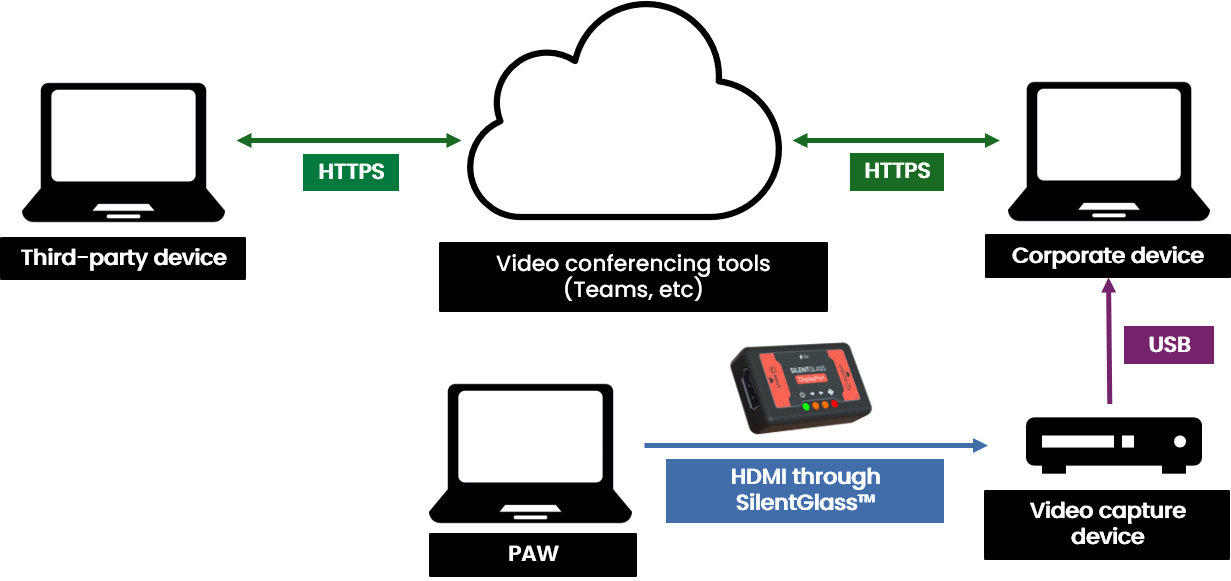
One alternative is to use an external video capture card to mirror the PAW display to a shared device. This allows others to view the session without giving the external device any control over the PAW or the system being managed. Combining this with SilentGlass, shown below, also breaks the digital-to-digital video connection, helping prevent malicious content from moving from the corporate device to the PAW.
Legacy software and local device connectivity
I need to support legacy infrastructure that depends on obsolete software and direct connections to local equipment. How can I do this securely from a PAW?
Maintaining legacy infrastructure often requires the use of obsolete software and direct connectivity to local equipment. While both introduce substantial risk and should be avoided where possible, there may be situations, particularly within operational technology environments, where they remain necessary due to the presence of legacy assets.
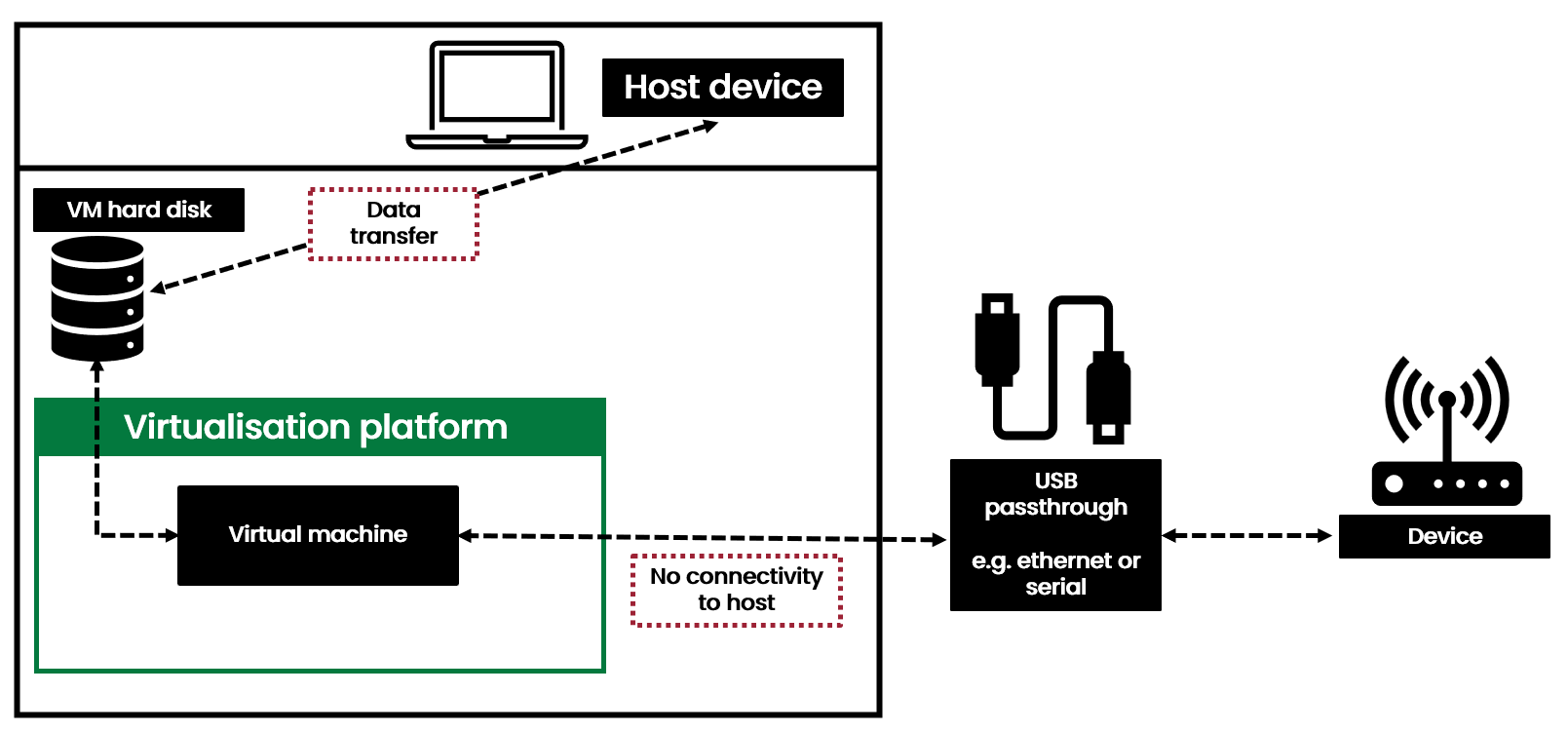
There may be circumstances where a PAW must either connect directly to local equipment or run obsolete applications or operating systems. In these situations, some of the risk can be mitigated by virtualising the required application or operating system, as covered in Principle 6.3. This adds a trusted security control in front of the untrusted virtual machine, making it harder to use the guest to attack the host machine.
Note that:
- A virtual machine should be used where connecting to local equipment requires privileged access to the PAW configuration (including administrative actions such as configuring the network interface or assigning an IP address). This prevents those privileges from being granted directly on the PAW host.
- Local equipment should not be trusted by default. It should be treated as potentially compromised, with the virtual machine providing an isolation boundary between the equipment and the PAW host.
- Where only direct connectivity to local equipment is required, the virtual machine should use a fully supported, up-to-date, and patched operating system.
- An obsolete operating system or application should only be used where the requirement cannot be met using a fully supported and patched operating system.
- Any obsolete operating system should be built from a centrally managed, trusted image with all required software pre-installed.
- The virtual machine must have no connectivity to the PAW host, either directly or through virtual networking, shared services, clipboard sharing, shared folders, device redirection, or other integration features.
- The virtual machine must have no connectivity to other virtual machines running on the same PAW. Each virtual machine should operate within its own isolated virtual network.
- The only network connectivity available to the virtual machine should be through a dedicated, directly attached network adapter connected to the target equipment or network.
- Where file transfer is operationally necessary, organisations should implement controls that reduce the associated risk. The virtual machine's virtual disk can provide a managed interchange mechanism for importing files required for administration activities and exporting logs, audit data, or other artefacts to centrally managed monitoring and logging platforms.
- Files transferred between security boundaries should be validated and handled through controlled processes appropriate to the level of risk.
- The virtual machine should provide a degree of isolation between the PAW and the connected equipment. If the equipment is compromised, any resulting attack should ideally be contained within the virtual machine, making it more difficult for an attacker to reach the PAW host or the wider administration environment.
Mobile connectivity
I need to use my PAW device outside of the office, but the principles advise against connecting to public wifi. How can I ensure secure connectivity?
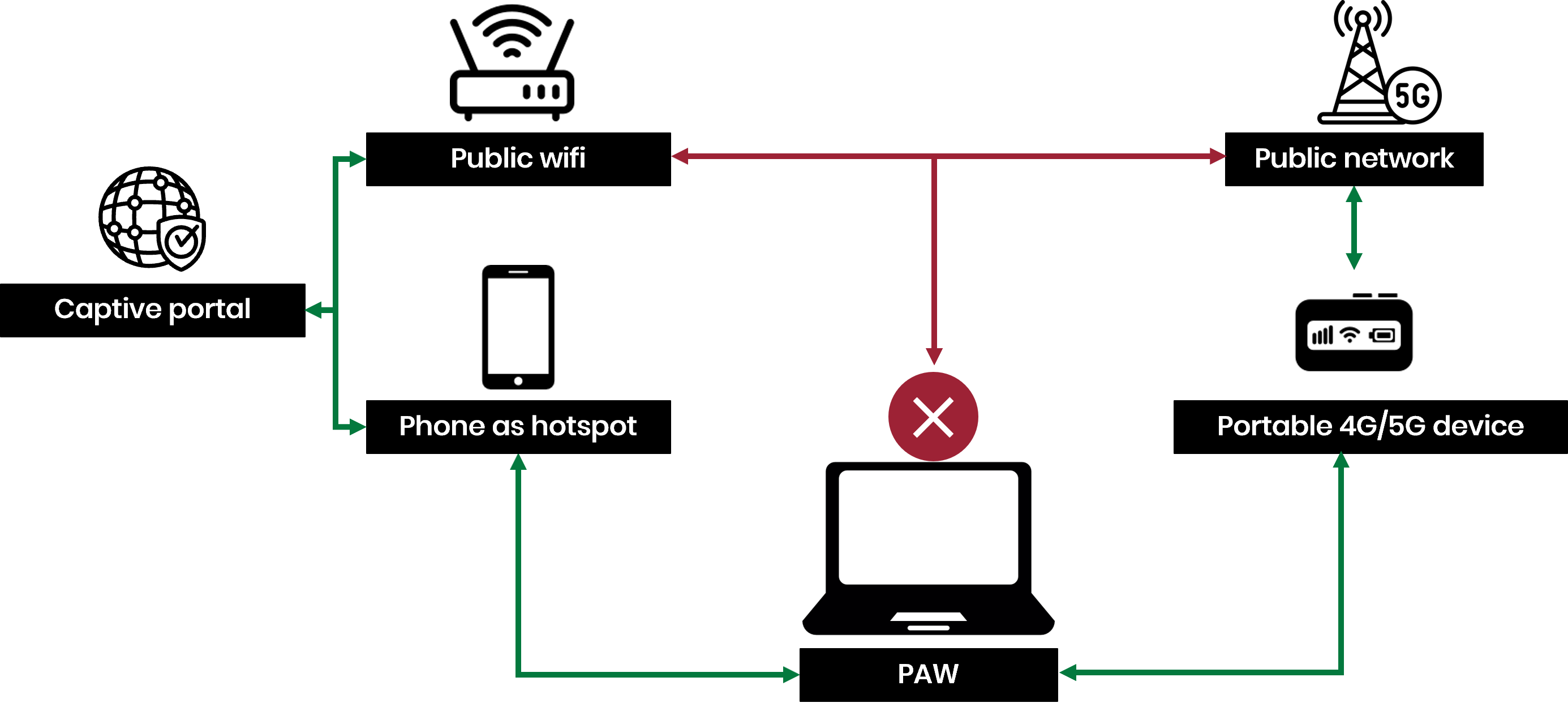
As discussed in Principle 5.2, the primary challenge for PAW devices when connecting to public wifi networks is the use of captive portals. A key PAW security control is not allowing rendering of untrusted web content, which is necessary to complete a captive portal. If on-the-go connectivity is required, you should instead use a corporate cellular device to provide a wifi hotspot for the PAW device.
The cellular device could be a corporate phone or a ‘MiFi’ (mobile wifi) device. A corporate phone is preferred, as it allows any required captive portal authentication to be completed directly on the phone rather than on the PAW. Where a MiFi device is used, any captive portal authentication would need to be completed from a separate device (i.e. not the PAW). The PAW controls will continue to protect the device, preventing direct connections from the corporate device, while encrypted protocols ensure that traffic remains secure in transit.
PAWs are not a technology that are being investigated or implemented by one sector, these are being rolled out across industry to protect high-risk access from persistent threats. One thing that was clear from consulting with industry is the breadth of solutions organisations have designed to work around unique business constraints and challenges. We hope the published PAW principles will provide a secure foundation to enable these further innovations.
There is no one size fits all solution for a PAW; they are bespoke by nature to ensure their attack surface remains small. However, the NCSC would encourage you to work collaboratively in your sector and wider industry. Share your lessons learnt and enable each other to both increase the effectiveness of implemented solutions and speed up the adoption of this defence.
The NCSC would equally like to hear new solutions you have designed to balance security and usability across your privileged management. If you’d like to share your feedback, please get in touch using your usual NCSC contact.