Device security guidance
Guidance for organisations on how to choose, configure and use devices securely.
Page 33 of 37
Action 1 - Determine your objectives, user needs and risks
Objectives
First, you need to establish what you want to achieve with BYOD. This will help you to understand whether it is an appropriate solution. To establish your objectives, you should consider questions such as:
-
Is BYOD intended to be an interim or long-term solution?
- Interim solutions should be just that. Longer-term practices will require regular review.
- Short-term solutions often start with the right intentions but can rapidly become long-term implementations that are not fit for purpose and difficult to remove, especially if used by a large volume of staff.
- If you decide this is purely a short-term solution, define an end date before implementation and do not deviate from it. If for any reason you need to extend the use of BYOD, prepare a fresh solution to take its place and consider something longer-term.
-
What business functions need to be achieved with BYOD?
- What and how BYOD is used will have a significant impact on your risk profile; and so you should determine what business functions you are trying to achieve with your BYOD solution and the inherent risks of doing so. Distinguishing the difference between ‘what you need’ and ‘what you would like’ from your solution can help. For example, minimal ‘keeping in touch’ facilities like calendars will present a lower risk than additional functionality like access to office functions such as documents and file sharing.
- You should also have a clear understanding of what BYOD should not be used for. For example performing remote system management should not be possible with BYOD.
-
What types of devices do you intend to facilitating work from?
- First assess the general categories of device: smartphones, laptops, desktop PCs, tablets, or a combination. It may be best to start with one category and then expand the deployment over time.
- Then define at a more granular level what platforms (and versions) you will/can support: iOS, Windows, Android, macOS. It will be useful to survey what devices and platforms are currently used by your BYOD workforce.
-
Will this be your only flexible working solution and where will BYOD devices be used?
- For example, will there be a mix of BYOD and Corporately Owned devices used for flexible working? Some users may not necessarily have/be able to afford devices capable of BYOD, so a hybrid model of both BYOD and Corporately Owned/Managed should be considered if flexible working is required.
- Will BYOD devices only be used for remote working, or will they also be brought into office spaces for flexible working and connected to ‘trusted’ networks?
Be aware of your capabilities
You should understand what your IT department will be able to cope with. Supporting all the devices that can be used for BYOD will almost certainly prove problematic.
Take on only what you can handle. Start by aiming to support the most common platforms already owned by your user groups, providing the most business benefit first, then expand if required.
User Needs
You will probably identify classes of users for whom BYOD is not suitable. For example, executive level managers who regularly handle higher sensitivity data. In these cases, you will need to decide whether to offer a limited subset of data and services through BYOD, or to exclude them from your potential BYOD solution.
Any groups you believe may be suitable, should be involved throughout the development process. This will help to ensure that your BYOD implementation is successful from a usability perspective.
You may discover during the development that BYOD is not suitable for all the groups that you initially defined.
Conflicting priorities
The priorities and desires of users and organisations will naturally differ. This makes it critical that your users are included throughout the development of your BYOD strategy.
Usability will be a focus for the device owners themselves, desiring no disruption of their usual experience of a device. They will also likely have concerns over the privacy of their personal data, the impact of which will vary depending on the degrees of corporate control you intend to implement.
An organisation will be more focused on the security and integrity of their data, services, and corporate infrastructure, whilst maintaining compliance with legal and contractual obligations.
Communicating the mutual responsibilities between employee and organisation will be critical to getting users safely on board with BYOD.
Risks
Before bringing BYOD into your organisation, you will need to consider the associated risks. Because the organisation will have less control and visibility of a user’s personal device than of a corporately owned and managed one, BYOD faces greater security risks.
To gain the most benefit from BYOD, an organisation will need to balance a more relaxed access posture to the exposed corporate services and data, while maintaining sensible security practices.
Catalogue corporate resources
While BYOD can be used for some corporate functions, there will almost certainly be aspects of corporate data and resources that need to be kept within fully managed environments.
You should manage expectations for all parties involved as, for many workers, they will not be able to completely replicate their corporate environment on a personal device. Instead, they may have access to a subset of applications and resources, the levels of which will be dependent upon the risk appetite of your organisation.
For example, users that have privileged or administrative accesses to corporate systems requiring Privileged Access Workstations (PAW’s) should not have these levels of access on a BYOD device. They could, however, be granted standard BYOD accesses that you would give to other users. These users should be prioritised for corporate-owned and managed devices if you have this as part of your flexible working solution.
Once you have catalogued your user groups and services, you should understand your risk appetite. No BYOD deployment will protect corporate data as effectively as corporately managed devices, so consider what would happen if the services you intend to expose were compromised and the business impact it would cause. Our guidance on risk management will help you to effectively determine the risk you face.
Risks of BYOD can include (but are not limited to):
- Easier user-initiated deliberate loss of data, eg copying data from work to personal apps
- Higher potential accidental data loss, eg device backups containing work data, users sharing their device with family
- Malicious exfiltration of data, eg malicious applications leaking data that users have allowed it to access
- Less trust in a BYOD device at the point of enrolment/first use
• A BYOD device will more than likely have had a life prior to its business use, and so when it is enrolled/first used for work purposes, there is no way of knowing whether it is in a ‘good state. As such, the device may not report ‘accurately’ to some questions about it’s health. For example, “what version of operating system are you running?”
- Workers having access to more resources and services than required
• Some corporate services may not be appropriate for BYOD use. The services exposed to BYOD should fall in line with your objectives, needs and risks. Most employees using BYOD will have only a subset of the resources they would have in an office environment.
• It may be that not all users of BYOD require access to the same resources. These should be tailored to the users/groups to minimise exposure of data and services. For example, workers in a finance department will likely need different applications to that of an engineering department. Probably neither will have the same resources as they would in the office.
• You may not be able to gain the assurance that corporate data, applications and credentials have been removed from the user’s device in the event that they leave the organisation, or their employment is terminated.
- Higher likelihood of unsupported or out of date devices, leading to exploitation of known security vulnerabilities by commodity malware
- Additional exposure of devices to threats because they are being used in a broader personal context, such as users sharing devices or passwords with others
- Users being less willing to report security incidents involving their personal device to an organisation for fear of intrusion into personal data.
There are risks that may also be present in corporately managed solutions, however in BYOD solutions the risks may be increased. These can include:
- Malicious exploitation of devices because of weak security configuration, for example no data at rest encryption, allowing data extraction or a lack of physical security controls on the device, such as Passwords/PIN/biometrics
- Malicious exploitation of devices remaining undetected due to lack of monitoring. Potentially leading to further spread of malware such as screen scraping and keyloggers, resulting in exfiltration of credentials and corporate data.
- Increased risk of device theft, loss and breakage
• Due to being transported more frequently (the device is a personal one and will likely travel with the user more frequently than a corporate one).
• If the device is broken, consider where the owner may have the device fixed. If they use a non-reputable source and corporate data is stored on the device, they may end up with access to your data.
• An additional consideration will need to be who will pay for the repair/replacement of a device if breakage occurs whilst being used for work; the user or the organisation? And how this may work from an insurance perspective.
- Use of unsecure networks and public locations, leaves risk of eavesdropping to access corporate resources (eg, public transport, cafés etc.)
- Infected devices, for example being taken into the office and connected to internal networks.
- External access to internal resources.
• Access from remote locations to services that traditionally would only be available from the office. In one form or another, data will be leaving and entering your network and traversing the internet to its destination.
• Additionally, users outside of the office space and controls may browse to non-professional content whilst connected to corporate infrastructure. Conversely, they may attempt to connect to corporate resources from personal accounts without sufficient corporate safeguards.
Avoid unplanned BYOD
Despite the increased risks with BYOD, it is still more secure to have an established flexible working practice than indirectly promoting the use of shadow IT.
Using the right technical and procedural controls can reduce many of these risks, but how and the degree to which this is achieved will be dependent upon the mix of technology used.
Explore the alternatives
Once you have established your objectives, gathered your user needs, and thoroughly understood the risks associated with BYOD in your particular case, you should consider whether there are any alternative flexible working solutions that are more suitable. You can then conclude whether to pursue BYOD as all or part of your flexible working solution.
Whist we do not consider corporately owned and managed models of flexible working as BYOD, they may be a suitable alternative. These include:
- Corporately Owned, Business Only,
- Corporately Owned, Personally Enabled,
- Choose Your Own Device,
- Personally Owned, Corporately Managed – where full device management is given to the organisation.
Further information on these can be found on the Infrastructure section of this guidance collection.
Mix and match BYOD example
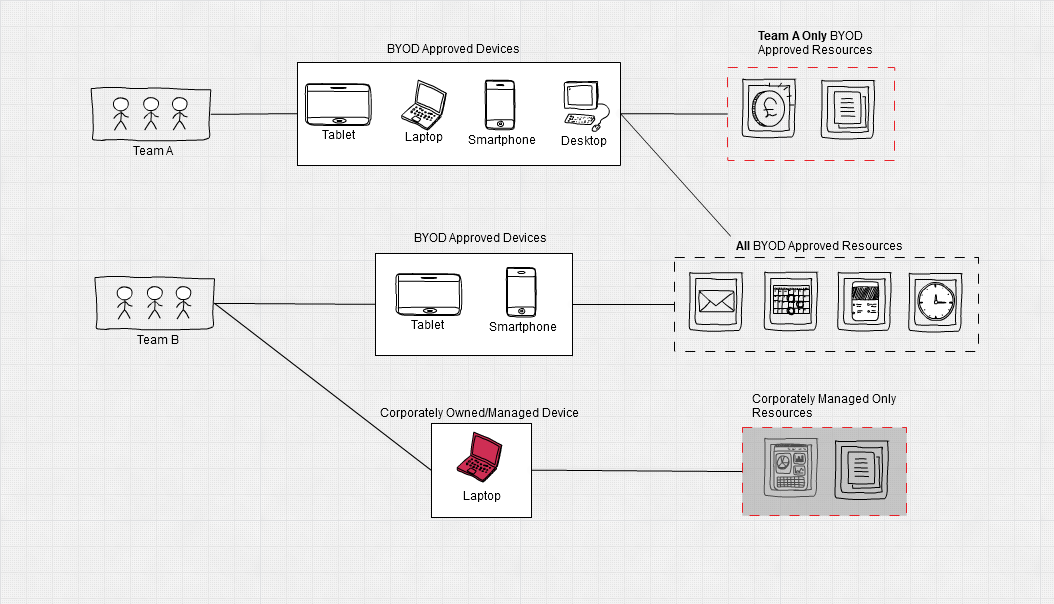
There is no ‘one size fits all’ BYOD solution. It could be appropriate for your organisation to adopt more than one model in tandem to achieve your goals in facilitating remote and/or flexible working.
In the example illustrated below:
- Your organisation wants to allow all workers to have the opportunity to use BYOD to view important communications from management, fill in their time sheets, and communicate with their local teams and HR over an instant messenger format using smartphones, tablets, laptops, or desktop PCs.
- The organisation also wants a limited number of BYOD users from specific departments to be able to view corporate email accounts and access a selection of non-sensitive documents to read/write/edit.
- A selection of users from certain departments require access to applications that are deemed suitable for remote access, but too sensitive for BYOD and require corporately owned/fully managed devices.