Comparing the security properties of traditional user credentials and FIDO2 credentials for personal use

asbe via Getty Images
Abstract
FIDO2 credentials, including passkeys (which synchronise across a user’s devices) and single-device passkeys, provide a modern alternative to traditional multifactor authentication (MFA) methods such as passwords combined with SMS codes or push notification approvals. FIDO2 credentials are designed with strong security properties including high entropy, per-account uniqueness and phishing-resistance.
This paper examines the threats targeting credentials used by individuals for personal purposes (as opposed to authenticating to their employer’s systems) and then proposes a credential lifecycle against which the functionality and resistance to attacks of traditional MFA and FIDO2 credentials are compared.
The comparison (Table 1) shows that at all stages of a credential’s lifecycle, and against all commonly observed attacks, FIDO2 credentials including passkeys are as secure or more secure than all forms of traditional MFA for individuals. Whilst this paper’s findings likely hold true for organisations as well, the NCSC has not yet formally assessed this, for example considering impacts of access models like Bring Your Own Device, personal accounts on organisational devices, legacy technology access and so on.
FIDO2 authentication, including where passkeys are used, is also assessed as providing equivalent to multi-factor authentication when the user is verified as part of the authentication.
However, to avoid undermining the security properties of FIDO2, users will need to:
- maintain the security of the device used to authenticate to a website or app
- choose their FIDO2 authenticator well
- ensure their sync fabric account is protected against phishing and has a secure account recovery option
- manage their own credential backups where they choose a single-device FIDO2 credential
As well as the requirements on users, websites and apps wanting to get maximal security benefit by offering FIDO2 authentication will also need to:
- put cross-site scripting mitigations in place to prevent proposed attacks against FIDO2 authentication
- unify registration and sign-in experiences behind a single domain origin or deploy support for WebAuthn’s Related Origin Requests as required for FIDO2 authentication
- make it possible for users to revoke the FIDO2 public key component from their accounts to invalidate any passkey that is no longer required
- consider suggesting to users who have a single-device FIDO2 credential that they register a backup to avoid the need to complete account recovery if the credential is lost
Introduction
Abuse of legitimate credentials is responsible for the majority of cyber harms to individuals. While the public is reasonably aware of attacks like phishing, there are multiple possible attacks against legitimate credentials.
Over the years, the security industry has responded to attacks by placing additional requirements on users (such as password complexity and length) or by requiring additional authentication factors. However, attacker tradecraft has continued to adapt and to circumvent these protections.
The industry group FIDO Alliance responded by creating FIDO (UAF & U2F and then FIDO2) authentication that sought to fundamentally solve the security issues with traditional credentials while remaining highly usable. To further increase usability and reduce costs, mobile device vendors support passkeys, that is, FIDO2 credentials that can be backed up and synchronised between a user’s authorised devices.
This paper compares the security properties of traditional credentials and FIDO2 credentials (including passkeys) for use in personal life. It is intended to aid security teams in understanding the extent of the risk carried by the services they support when consumers/customers authenticate with traditional credentials, and whether adding support for FIDO2 itself introduces risk. It also aims to help technology-literate individuals compare the risks and benefits of using FIDO2 credentials - such as passkeys - in their personal lives.
While much of the analysis in this paper also applies to enterprise authentication scenarios (for example staff authenticating to a Single Sign On), the different threat model and usage scenarios mean this paper is not intended for enterprise risk assessment.
Definitions
Several terms related to authentication can have different meanings to different people, or are less common terms. Table 2 below lists such terms and the definition used in this work.
The credential lifecycle
A user’s credential will go through discrete stages over its lifetime, from creation through to revocation. A model for the stages is shown in Figure 1 and will be used as the framing for this paper.
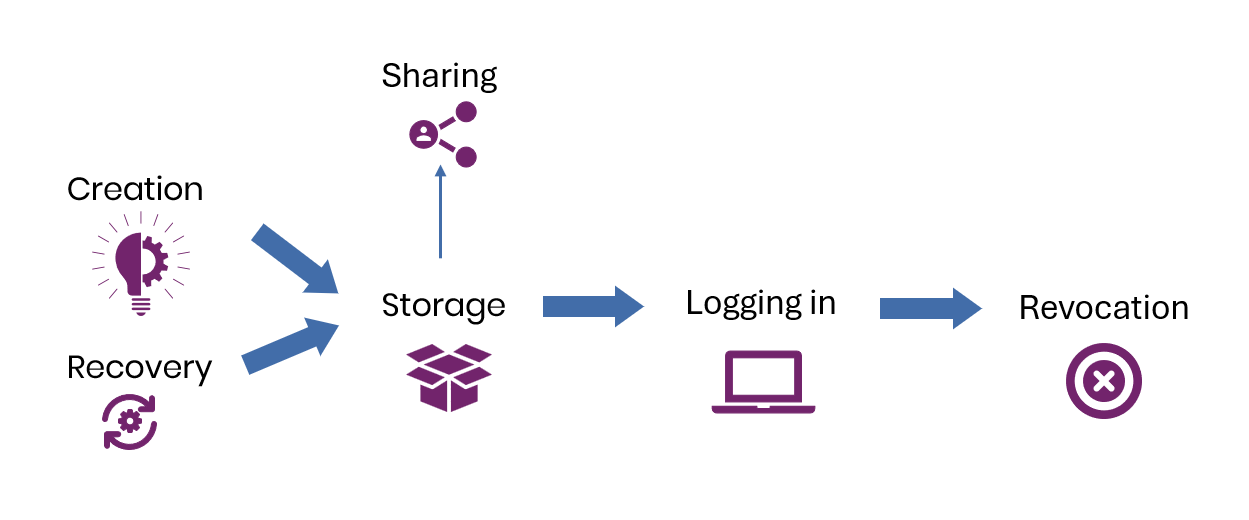
At each stage of the lifecycle, there are different possible attacks, and different capability actors that might be able to conduct such attacks. While the above is a conceptual model, the stages of a credential’s lifecycle take place in or across different systems. A detailed formal threat model for passkeys, incorporating the different systems involved in an authentication has been produced by the BSI.
Attacks on credentials
To accurately compare the security of different authentication mechanisms, it is important to consider the specific attacks on those credentials at different lifecycle stages.
Threat actors
Individuals (and indeed organisations) can face very different threat actors. All users of the internet will face attempted attacks from lower-capability actors using automated tooling. Some individuals may face more targeted attacks, such as from criminals looking to deploy ransomware or steal data for extortion. Higher-profile individuals or particularly wealthy individuals may be targeted by well-funded organised crime, and finally, a small number of individuals may be targeted by capable and well-funded state (or state-linked) groups (NCSC 2024).
(Sella Nevo et al 2024) present a classification of actor capability (Table 3 below) through the lens of how much money they are willing to spend on an operation, ranging from relatively small sums that almost any attacker could afford, to billions of dollars.
Nevo et al focus on attacks targeting companies producing large language models, and as such only include attackers relevant to that threat model. Additional attacker capability groups relevant to the individual include persons such as family/household members who have physical access to the individual’s devices, and potentially the passcode to devices.
While Nevo et al describe a large range of attack vectors broken down by operational capability, not all are directly relevant to attacks on credentials. Table 4 lists the attack vectors that apply to credential phishing and the assessment from Nevo et al of how likely different capable actors are to succeed.
While FIDO2 credentials can provide protections against highly capable actors, this paper will focus on lower capability actors (OC1-OC2) as these actors cause the largest scale of harms to individuals.
An attacker category not addressed by the work of Nevo et al is that of an attacker with legitimate access to the target’s devices, or to spaces where the device might be left unattended such as a partner, family member or roommate. Such an attacker is not 'funded' in the same way as classical attackers, but effectively starts from a highly privileged position through their access to the target’s device, and potential knowledge of the device passcode.
Different devices are vulnerable to different attackers
Commodity malware such that could affect credential security is predominantly a desktop/laptop-class phenomenon because Windows/macOS allow socially engineered user-level payload execution – that is, execution of code – which then broadly has the permissions of that user to their data. Malware running as the user is typically able to compromise the data of all other applications running as the user.
This contrasts with mobile attacks, where applications installed by the user have only select capabilities that require explicit user consent, such as reading SMS, the contents of the screen or notifications. Mobile operating systems typically do not offer applications or users the permissions for an application to have broad access to the data held by other applications, instead requiring exploitation of the operating system itself to do so.
As a result, the cost of exploitation tools for desktop operating systems has diverged increasingly from those targeting mobile platforms, as the cheapest of those attacking desktop operating systems require no exploits to provide broad access to user data, whilst those targeting mobile devices will always require exploits. Attackers are even able to use free or open source tools to attack desktop operating systems, often modifying them to avoid detection by antivirus, whilst the tooling required to do similar for mobile devices is reported to cost millions of dollars from vendors that report they will only sell to government bodies (Wikipedia n.d.).
As such, this work assumes that all attacker capability levels might successfully compromise a Windows or macOS device, while only highly-resourced actors would be able to compromise arbitrary user data on a mobile phone or tablet.
Current state of attacks on legitimate credentials
To understand the necessity of specific mitigations, it is important to understand the specific attack techniques being used by attackers. Table 5 uses the credential attacks identified by Nevo et. al. and, by comparing them with public reporting and NCSC internal reporting, provides specific attack techniques observed in the wild along with an indication of their prevalence.
| Nevo Category | Attack Vector | Prevalence (Microsoft Digital Defence Report 2025) |
|---|---|---|
| Social engineering | Credential harvest | Not referenced |
| Password brute-forcing and cracking | Password brute-force | 97%* |
| Exploitation of exposed credentials | Credential stuffing | 97%* |
| Social engineering / running unauthorised code | Installation of credential stealers / infostealers | 2.40% |
| Social engineering | Adversary-in-the-middle phishing | 0.24% |
| Social engineering | Fatigue attacks | 0.0033% |
| Added: Physical device access | Device password/passcode known to attacker | N/A |
The final category, physical device access, is not present in the work by (Sella Nevo et al 2024) et al in the form we are using it. This is where an attacker (typically known to the target) may have access to a physical device and know its passcode/password perhaps through observation of its entry, or a particularly guessable choice.
Microsoft’s data covers billions of attacks seen, including automated attacks sending huge volumes of opportunistic traffic. As such, techniques like adversary-in-the-middle (AitM) remain a concern despite their relatively low prevalence. AitM attacks are far more likely to be successful than bulk spraying of passwords, and numerous parties are seeing continual replacement of credential harvesting with AitM phishing.
Security at each stage of the lifecycle
This section walks through the lifecycle stages of a credential in a roughly chronological order, noting that sharing and recovery may never happen and, if they do, can happen at any point between creation and revocation.
Each lifecycle stage is examined in 3 parts:
- How tMFA and FIDO2 credentials operate at that stage.
- What the principal attack types currently observed and relevant to that stage are, and assessment of how effectively each credential type withstands them.
- A comparative assessment of the overall security provided by tMFA and FIDO2 at that point in the lifecycle.
Creation
A credential must first be created, and for tMFA multiple credentials need to be created.
Attacks
Attacks targeting the creation of the credential focus on whether a third party can ascertain or influence the secret(s) that is/are created. The table below shows the likelihood of successful attack by attackers with operational capability (OC) of 1-2. A '-' (minus symbol) indicates that the credential is not safe from attackers with OC1-2 using that technique.
Security comparison
FIDO2 inherently protects against the relevant attacks against credential creation through use of trusted, industry-standard cryptographic algorithms that creates keys that are strong against attacker attempts to brute-force or predict.
A FIDO Authenticator automatically generates unique FIDO2 credentials for each mapping of the relying party and user account (”handle”), meaning intentional re-creation (or ’re-use’) of the same credential between accounts or services is impossible.
Traditional MFA by comparison offers less protection – a password is vulnerable if it is reused or poorly generated, making it vulnerable to low capability attackers. Data from Microsoft and others show that automated attempted exploitation of reused and weak passwords is rife.
The additional factors that supplement a password in tMFA are typically created in a more controlled, programmatic manner and as such 2SV avoids many of the flaws in traditional password creation that attacks often exploit. Microsoft’s data indicates that 97% of credential attacks that they see would be mitigated by 2SV (Digital Defense Report 2025).
Storage by user
Following creation (including re-creation following recovery) of the credential(s), the user must securely store them to keep them secret.
Attacks
At the operational capability levels that are the focus of this paper (OC1-2), there are two main attack vectors: through installation of malware, and through exploiting physical access to the device. For malware, it is expected that people are infected through large compromise campaigns that target devices on mass rather than a specific owner of a device, or someone may be specifically targeted (for example if they have significant financial assets).
Malicious physical access to the device is most likely to occur through opportunistic theft, or from an attacker with legitimate access to the device or property where it is stored.
Security comparison
The threats against user-stored credentials are highly dependent on the operating system and the security of the credential manager used.
Credential stealers / infostealer malware
Running malicious code with the privileges necessary to target credentials is outside of the capability for the majority of attackers (OC1-3/4) on iOS and Android platforms.
However, the theft of credentials by malware is an increasing threat on Windows and macOS devices, both in the volume of malware being seen, and the sophistication. Common ‘stealers’ will log keystrokes for typed-in passwords as well as exfiltrate session cookies, plus maturing capabilities to access browser password vaults, third-party password vaults, certain cryptocurrency wallet stores etc.
The platforms’ (Windows/macOS) first party credential managers use APIs and the hardware security elements of their devices to provide additional protections to credential stores, such that malware should not be able to extract the credentials without additional attacks. The same protections can be used by third party credential managers, but they must choose to use them, which not all do (Gray et al 2017).
Physical access
An attacker who has stolen a device and has the passcode to the device (and that of the credential manager, if it is different) will be able to view and export passwords and other credentials depending on the credential manager. This may include passkeys/FIDO2 credentials where credential exchange is supported. This scenario is most likely in situations of coercive control or technology-enabled domestic abuse. A less likely but possible alternative scenario is where the device has been stolen after the attacker has observed the PIN/passcode being entered.
An attacker who does not know the device passcode or PIN may have contacts who can attempt to get a disk image of the device and extract credentials. Generally, modern devices have encryption that prevents this, but an attacker on OC1-2 may be able to recover credentials in a case where the device isn’t encrypted, and where credentials are stored in a file or an insecure credential manager not effectively protecting its vault.
Logging in using a device that stores the credentials
A user will need to log into a site or app for which they have valid credentials that are available on the device they are using.
Attacks
Security comparison
Phishing, also known as credential harvesting - where a user is tricked into giving out their password - is a common threat on the internet. Attackers create a fake site and get the user to visit, either through sending a link (email, SMS, QR code) or through paying for an advert to be shown to the user, or a tactic like choosing their URL such that it might be visited if someone mistypes the real URL.
Once on the site, the user is tricked into logging in and then convinced that they don’t need to do anything further, or are directed to log in again at the real site. Meanwhile the attacker is storing the entered usernames and passwords, which they can then test or sell.
A login that requires any form of 2SV will prevent an attacker logging into that site, but the attacker will still get the password. If they have reused the password elsewhere, those website accounts would be vulnerable to credential stuffing if not also requiring 2SV.
However, some 2SV methods can also fail when attackers are more persistent. For example,
- attackers have been able to bypass notification/approval-based second factor by making multiple login attempts in the hope that the user gets fed up and approves (known as a fatigue attack) (Cisco Talos 2024)
- attackers conduct SIM-swap attacks to gain access to codes sent by SMS, or compromise poorly protected email accounts to get access to codes sent by email
FIDO2 authentication is inherently safe against these techniques as the protocol design protects against them. Unlike password-based credentials, FIDO2 uses asymmetric cryptography where the user signs a unique per-request-challenge and the private key is never shared with the user's client or relying party so it cannot be copied or stolen by a credential harvesting site.
AitM phishing is a technique attackers are rapidly adopting whereby the server used to display a fake login page to the user also logs into the real website by passing through credentials the user has entered. This means that any 2SV prompts from the real website can be relayed to the user for completion in near-enough real-time, and therefore before any 2SV codes expire.
After proxying a successful authentication between the legitimate user and the legitimate relying party, the attacker’s server retains a copy of the post-authentication session cookie, which can then be used by the attacker to achieve their goals.
All tMFA factors are vulnerable to this style of attack, since none of the credentials are bound to only the real site, allowing a user to accidentally enter them into a fake login page.
No FIDO2 credential type is vulnerable to this style of attack, as the authentication is tightly bound to the TLS-authenticated domain. A FIDO2 authentication includes automatic, cryptographically-backed binding by the FIDO authenticator and the user’s trusted browser or app. This binding checks that the origin (‘domain’) identifier of the site being used - as reported by the user’s trusted browser - is an acceptable match to the one that the credential contains in its metadata, set when the credential was created and registered. Importantly, in a trusted browser or app, this reporting is not controllable by any content of the site itself. Only FIDO credentials matching the identifier of the current site are offered by a FIDO authenticator.
Potential attacks
At the time of writing there have been no attacks on FIDO2 authentications reported in the wild. Downgrade attacks are sometimes reported on FIDO2 protected accounts where the attacker has instead downgraded the authentication to use non-FIDO mechanisms / tMFA.
There have been attacks of FIDO2 authentications reported in academia or other research fora, covered below, that have some key constraints that will likely prevent them becoming commonplace.
Malicious client/modified client: Research showing that a malicious browser extension (or more theoretically, malicious JavaScript delivered by cross-site scripting/XSS) can replace the browser’s normal JavaScript APIs for FIDO2 authentication. While this cannot leak or interfere with existing FIDO2 credentials, the user could be convinced to create a new FIDO2 credential for the target site, which could be intercepted by the extension (Goodin 2025).
Academic research has identified other attacks that become possible if the user’s client is modified or otherwise untrusted, such as silently adding an attacker’s credential to the user’s account either during creation or once logged in (Yadav and Seamons 2023).
An attacker in a position to compromise the user's client could achieve their aims directly, i.e. access data post login regardless of the authentication mechanism, and could therefore equally compromise data protected by passkeys, or passwords and tMFA credentials.
Browser in the browser: A technique demonstrated in a paper by (Catalano et al 2025) uses XSS to deliver a browser in the browser technique that tricks the user into logging into the website on a host controlled by the attacker. The attacker must find exploitable reflected XSS in the target website, whereby they construct a payload that, when processed by the user’s browser, replaces the legitimate relying party’s content with a remote connection to a virtual machine controlled by the attacker.
That virtual machine runs a modified browser so that when the user logs into the target site on the attacker-controlled machine, the passkey authentication is tunnelled to the user’s trusted browser, where the user completes the authentication. This results in a logged in session on the attacker’s browser.
Whilst this attack is feasible, the impact for accounts using passkeys to authenticate is identical to those using tMFA to authenticate – an attacker with XSS could access all data in the context of the user post login. Websites are able to greatly reduce the impact of XSS issues through modern protections like Content Security Policies and trusted types that make XSS exploitation difficult or impossible.
Separately to XSS, attackers may search for scenarios where they are able to ‘tunnel’ FIDO2 authentication from a remote client to the user’s local client (while not using the ‘cross-device’ flow described below) and still passing the domain-binding checks of FIDO2.
Logging in using a device that does not store a credential
Users may need to log into a website or app while using a device that does not store (or have other access to) the credential needed for that site. An example might be a device new to the user, less regularly used, such as a device owned by a third party such as that of a friend.
| tMFA | FIDO2 |
|---|---|
| The authentication process is largely identical to that of logging in where the credential is stored on the device, with the exception that all credentials will need to be typed in to the other device (apart from notification-based 2SV, which completes normally). | FIDO2 specifies a ‘hybrid’ or ‘cross-device’ flow for the scenario for when the user wishes to log in on a device that doesn’t have their FIDO credentials stored, from another nearby device that does have their credentials stored (Fido Alliance, CTAP-Hybrid 2023). The user triggers a login on the second device (which lacks a relevant FIDO2 credential) and selects the option for cross-device authentication, which is often referred to as ‘Choose passkey on another device’, ‘Sign in with QR code’, or similar. The client on the second device triggers its operating system to display a QR code, which the user scans with the primary device (which has the intended credential stored). When scanned, this triggers the two devices to establish a connection over Bluetooth LE, using data from the QR code, to prove physical proximity and prevent remote phishing attacks. The Bluetooth connection is used to agree an online server that the relying party and the authenticator both trust to use to proxy the authentication. Once authentication is successful, the relying party creates a session with the second device (that did not have a credential), without that device ever having had access to the FIDO2 credential. |
Attacks
Security comparison
The risks of using tMFA are largely identical regardless of the device as none of the credentials are ‘bound’ to a device or authenticator. As such, tMFA has the same risks as when a user logs in with their normal device. In addition to the risks when the user logs into their own device, there are risks the owner of a secondary device is malicious and configured that device to intentionally capture entered credentials.
The hybrid or cross-device FIDO2 flow is relatively complicated under the hood, but that complexity is necessary to meet the user need while mitigating threats and is abstracted away from the user. It manages to achieve phishing resistance through proving physical proximity of devices (with Bluetooth LE or similar technology), as well as the regular FIDO2 binding of a credential to the domain, without revealing the private keys from the FIDO authenticator to the client (second) device.
Potential Attacks
Phishing with physical proximity proxy: A potential attack is where an attacker-controlled device is planted in physical proximity to a user and the user is socially engineered into completing cross-device authentication for a target account. This could be by displaying a recently-generated sign-in QR code from the target relying party, or sending the victim a link to an AitM site that displays such a QR code. If the user scans the attacker-initiated QR code and initiates a cross-device flow to the nearby attacker-planted device, this device can proxy the necessary data for completion of the proximity proof challenge before proxying the result back to the attacker’s remote device as if it was located where their planted device was. This is a theoretical attack that requires attacker-controlled equipment to be placed in physical proximity to targets. The NCSC believes that actors with this level of capability could also compromise any tMFA method.
A vulnerability was also found and fixed in 2024 whereby mobile device browsers could be re-directed to handle a FIDO:/ protocol request, meaning the user would not need to scan a QR code (Righi 2025) and instead merely approve the connection. This was fixed so that browser re-directs can no longer trigger the FIDO:/ protocol handler on impacted platforms.
Bluetooth-enabled malware: proof of concept research has demonstrated that a remote attacker could use malware installed on a device in proximity to the target (such as a Windows or macOS laptop) to tunnel the Bluetooth component of a cross-device authentication flow. This could allow the attacker to modify the destination site, causing the user to connect to a different site than intended (Kniep 2025).
One risk considered in this work was whether WebBLE - an experimental extension to HTML that enables browsers to communicate over Bluetooth Low Energy (BLE) - could be exploited by a malicious webpage to intercept nearby FIDO cross-device authentication flows. At the time of writing, the browsers tested prevented WebBLE connections from attempting to use the reserved FIDO service endpoints.
Synchronising credentials across devices
Many users have multiple devices and will want their credentials to be available on the different devices they regularly use.
Attacks
Security comparison
Credential synchronising across a vendor-provided ‘sync fabric’ is terminology typically associated with passkeys, and is often cited by critics of passkeys as a key failing of the technology, yet the same principles (and indeed sometimes the same sync-fabrics) apply to much of tMFA.
Where a password is stored off the device by remembering it, there is a strong chance the user is reusing a password. Arguably, reusing a password could be visualised as “synchronising” password with every site it is used for – as compromising that site could give the attacker the password.
Password managers / credential managers typically use a sync fabric that will synchronise passwords, passkeys, and TOTP seeds that they store. Codes sent by email are effectively synchronised as the user typically logs into their email account on multiple devices. Furthermore, those email accounts are often the same account fabric used to back a password manager / credential manager account.
Codes sent by SMS or generated by a TOTP token are not synchronised, and therefore wouldn’t be exposed should an attacker phish the sync fabric, yet remain phishable themselves.
The FIDO2 specification describes a sync fabric but does not specify the implementation or minimum security requirements of the fabric, instead leaving it up to vendors to implement as they choose. This results in differences to usability, security, availability, and other properties, of the sync fabrics themselves.
The first party sync fabrics (Apple, Google, Microsoft) reviewed by the NCSC (in 2025) all:
- mandated two factor authentication in order to store passkeys
- supported passkeys / phishing-resistant authentication themselves
Third-party sync fabrics are more varied, with (Bader 2026) reporting that several well-known third-party credential managers do not require MFA to create or store passkeys, increasing the risk that users will protect their passkeys with a sync fabric that only requires a password.
There is also diversity in whether it is possible to protect third-party sync fabrics with a passkey – meaning users must be careful to choose a third-party credential manager that supports secure and phishing resistant authentication on the account used to access it.
Credential revocation
A user may sometimes need to revoke their credentials, for example if they have lost the credential and need to replace it with a new one, or where they suspect compromise of the credential.
| tMFA | FIDO2 |
|---|---|
The majority of websites and apps have a ‘change password’ functionality, and an increasing number also have an ‘invalidate current sessions’ function that will force reauthentication with the new credential. Similarly, the majority of websites and apps will allow adding, removing, or changing second factors. These changes are not typically reflected in a user’s password managers etc until the user automatically updates them. | Relying parties will generally allow a user to add or remove specific FIDO2 credentials, often providing an option to invalidate current sessions, forcing a reauthentication. However, there are occasional sites that do not yet provide an option to delete the public key component of credentials, for example TikTok at the time of writing (Logging in with a passkey). When a relying party supports removal of FIDO2 credentials, the process typically causes the public component of the credential to be deleted, denying future authentication by someone in possession of the private part. A recent addition to WebAuthn allows a relying party to communicate to an authenticator that it may need to delete an ‘orphaned’ credential (WebAuthn Signal API n.d.). A user can also delete their credential (ie, the private key) from their device or sync fabric but this does not automatically invalidate the public key’s validity with the credential provider, meaning that if the private key had been compromised or shared, it would be usable until the user triggered a deletion of the public component as well. |
Attacks
There are no attacks seen in the wild that target credential revocation itself. There are attacks seen where an attacker will gain control of an account (typically through credential stuffing or phishing) and then set up new credentials, revoking those of the legitimate user. These attacks should be prevented if only passkeys are used, with no weaker password or tMFA options supported as a ‘fallback’.
Security comparison
Beyond maturity of support for removing credentials from the relying party - and that triggering the removal of a credential on the authenticator - there is little difference between tMFA and FIDO2 in real attacks. One difference however is that users are generally used to changing their passwords if they have been breached while, because passkeys are both less commonly used and significantly less likely to be breached, users may struggle to understand how to replace their passkeys if they were to be breached.
It is common practice (and the NCSC would recommend) for relying parties to support registration of multiple FIDO2 credentials on a single account. For accounts that are required to be shared among multiple people, this permits each person to have their own unique credential. If an individual no longer needs access to the shared account, their specific FIDO2 credential(s) can be revoked without impacting any other individual’s FIDO2 credentials. This is unlike common practice with passwords and some types of tMFA where only one registered credential is allowed. In this same circumstance, tMFA credentials must be revoked and re-issued to all remaining individuals. If this is not done, there is a risk that individuals retain access to accounts they no longer need access to.
Potential attacks
CTAP Protocol Attacks – The Client to Authenticator protocol (CTAP) defines communications between a user's device and a separate authenticator (for example, a FIDO token). Some implementation vulnerabilities have been reported that allowed deletion of credentials if an attacker either:
- had control of the device to which the FIDO token was connected
- was within reliable NFC range of the token (Casagrande and Antonioli 2024).
These issues were fixed by manufacturers in their updated models. As such, the NCSC does not consider them to pose a threat.
It is also worth noting that an attacker with control of a user’s device would typically be able to delete mobile-based MFA (tMFA) credentials stored on that device. This would force a user to re-register their MFA and potentially give this attacker access to the new credential.
Credential / account recovery
A user may lose access to their credentials, and therefore the account. As such, they’ll need to either regain access to their credentials or prove their ownership of the account through a different mechanism, and create new credentials.
| tMFA | FIDO2 |
|---|---|
If a user reuses the same password across multiple sites and does not use tMFA, the most likely way they would lose access to an account - aside from forgetting the password - is if an attacker compromises the account and locks them out. If a user relies on a credential or password manager and/or tMFA, there is a risk of losing access to their credentials if their device is lost. However, where the credential manager synchronises data across devices, and the user has access to another enrolled device, access can typically be restored by signing in to the credential manager account on a new device. If the credential manager does not synchronise credentials across devices, then a device loss will necessitate an account recovery flow for each account. The vast majority of websites and apps will offer a ‘forgot password’ functionality. This typically leverages a code or link sent to the email address registered with the user’s account, thereby effectively reducing the security of the service to that of the email account. More rarely, some services will require additional checks, such as security questions (to which the answers are often discoverable or can be socially engineered), or a code sent via SMS to the registered number. | If passkeys are in use, they will be backed up and synchronised to the sync fabric and so will be propagated to any other devices in the sync fabric. This means that when a user has multiple devices, a single device loss does not affect access to credentials. If a user does not have multiple devices accessing the sync fabric, they would need to use a new device (bought or borrowed) to regain access to the sync fabric via its account recovery process. If a user is using a single-device FIDO2 credential, such as a FIDO token, device loss means loss of the credentials. In this instance a user would need to use account recovery flows for each of their credentialed accounts. Account recovery would be the same as for tMFA. |
Attacks
Attackers are seen to target account recovery for both tMFA and FIDO2 protected accounts, as the recovery process can often be weaker than the authentication to the account. This is particularly common in two cases:
- financially motivated attacks
- where the attacker already has access to the victim’s email account
In the case of financially motivated attacks, attackers are willing to spend more money on their attack, such as paying for a SIM-swap attack on the victim where the recovery flow requires it.
Whilst not an ‘attack’, a device loss can result in loss of access to certain credential types. The table below shows the resilience – in terms of availability - of tMFA and FIDO2 to a device loss.
Security comparison
From a pure availability perspective, using an easily remembered password with no MFA makes it unlikely that a user will lose access to their credential. However, this significantly increases the risk of account compromise by commodity attackers, who may gain access and lock the user out.
Introducing a device into the authentication process - whether through a credential/password manager, tMFA, or FIDO2 - substantially reduces the likelihood of credential compromise (Microsoft reports a 97% reduction in risk (Digital Defense Report 2025)). However, this introduces a new dependency: loss of the device may result in loss of access to credentials.
With tMFA methods, recovery depends heavily on the specific implementation. Some tMFA approaches make account recovery relatively straightforward in the event of device loss, while others make it more complex. For example, if a password manager is not synchronised, losing the device may result in permanent loss of stored passwords. If it is synchronised, the user can recover their credentials by regaining access to the sync fabric from another device.
Passkeys, as defined by the NCSC, are always synchronised. This reduces the likelihood of permanent credential loss, as users will typically either:
- have a copy of the passkeys on another device enrolled in the same sync fabric
- be able to regain access to the sync fabric on a new device and restore their passkeys
In contrast, non‑synchronised FIDO2 credentials - such as single-device passkeys - cannot be recovered if the device or token is lost, unless additional authenticators were previously registered.
Where account recovery is required, the recovery process is generally similar regardless of whether the account is protected by tMFA or passkeys. As passkeys become more widely adopted, recovery flows may become a more attractive target for attackers, potentially requiring stronger and more resilient recovery mechanisms than are commonly deployed today.
Overall comparison
Current security state
Drawing on the analysis above, and the attack techniques ranked by prevalence in Table 5, we can assess how tMFA and passkeys perform against the attacks seen in the wild.
Table 19 indicates whether each credential type is vulnerable to the credential attacks currently seen in practice. At the time of writing, there are no reports of attackers in the wild phishing a user’s sync fabric to gain access to passkeys. However, as this scenario is frequently raised in discussions about passkey security, it is included in Table 19 for completeness.
| Credential harvest | Password brute-force | Credential stuffing | Device malware / infostealer | Adversary-in-the-middle phishing | Fatigue attacks | Phishing the sync fabric | Device theft /w weak PIN | |
|---|---|---|---|---|---|---|---|---|
| Password only | Always vulnerable | Situation dependent1 | Always vulnerable | Always vulnerable | Always vulnerable | Always vulnerable2 | Potentially vulnerable | Potentially vulnerable |
| Password only (user generated / remembered) | Vulnerable | Situation dependent1 | Vulnerable | Vulnerable | Vulnerable | Vulnerable2 | Not applicable | Not vulnerable3 |
| Password only - created and managed by a credential manager | Vulnerable | Not vulnerable | Not vulnerable | Vulnerable | Vulnerable | Vulnerable2 | Vulnerable | Vulnerable |
| Credential harvest | Password brute-force | Credential stuffing | Device malware / infostealer | Adversary-in-the-middle phishing | Fatigue attacks | Phishing the sync fabric | Device theft /w weak PIN | |
|---|---|---|---|---|---|---|---|---|
| Traditional MFA - password and traditional second factor | Never vulnerable | Never vulnerable | Never vulnerable | Potentially vulnerable | Always vulnerable | Potentially vulnerable | Situation dependent5,6 | Commonly vulnerable |
| Password and software TOTP app / app approval | Not vulnerable | Not vulnerable | Not vulnerable | Vulnerable | Vulnerable | Vulnerable | Situation dependent5 | Vulnerable |
| Password and email OTP | Not vulnerable | Not vulnerable | Not vulnerable | Not vulnerable | Vulnerable | Not vulnerable | Situation dependent6 | Vulnerable |
| Password and SMS OTP | Not vulnerable | Not vulnerable | Not vulnerable | Situation dependent4 | Vulnerable | Not vulnerable | Not vulnerable | Vulnerable |
| Password and hardware OTP | Not vulnerable | Not vulnerable | Not vulnerable | Not vulnerable | Vulnerable | Not vulnerable | Not vulnerable | Not vulnerable |
| Credential harvest | Password brute-force | Credential stuffing | Device malware / infostealer | Adversary-in-the-middle phishing | Fatigue attacks | Phishing the sync fabric | Device theft /w weak PIN | |
|---|---|---|---|---|---|---|---|---|
| FIDO2 credential | Never vulnerable | Never vulnerable | Never vulnerable | Situation dependent7 | Never vulnerable | Never vulnerable | Situation dependent8 | Potentially vulnerable |
| Synced passkey | Not vulnerable | Not vulnerable | Not vulnerable | Situation dependent7 | Not vulnerable | Not vulnerable | Situation dependent8 | Vulnerable |
| Single device passkey | Not vulnerable | Not vulnerable | Not vulnerable | Situation dependent7 | Not vulnerable | Not vulnerable | Not vulnerable | Vulnerable |
| FIDO2 key + PIN/Password | Not vulnerable | Not vulnerable | Not vulnerable | Not vulnerable | Not vulnerable | Not vulnerable | Not vulnerable | Not vulnerable |
- Where user-generated password is guessable/weak.
- A fatigue attack is defined as where the attacker has access to user’s password and repeatedly triggers the sending of an approval request to fatigue the user into accepting. By definition they have the password.
- If a user uses a password that they remember and it is not stored in any credential managers on the device, then theft of a device even with the PIN won’t reveal that password.
- Generally not vulnerable to desktop malware, as SMS messages are not usually accessible from the desktop environment. However, malware on Android devices can intercept and capture SMS authentication codes.
- Vulnerable if the Credential Manager sync fabric holds the TOTP.
- Where the email account is also the account for the sync fabric, or content contained by the sync fabric enables access to email content.
- Vulnerable if the Credential Manager is not using OS-level secure storage mechanisms for the key material.
- Vulnerable if the sync fabric is not protected with phishing-resistant authentication.
As can be seen, at the time of writing FIDO2, including both single-device credentials and synced passkeys, provides greater security against every common attack seen against credentials.
Occasionally arguments are made that FIDO2 is in some way worse than tMFA – perhaps that there is a greater risk of a device loss leading to access loss, or that the introduction of a sync fabric introduces a new risk.
Such arguments tend to be comparing FIDO2 and passkeys to tMFA, but an idealised version of tMFA is used as the comparison, ie, a complex, unique, remembered password and a robust second factor that the user would only ever use correctly, on a device only the user can access and would never lose or break.
However, an accurate comparison means considering:
- Where users pick passwords, they typically pick weak or reused passwords.
- Where users do not pick passwords, they are generally using a password manager on their device(s), which then has many of the properties criticised of passkeys (a sync fabric to target, device loss issues if not synced).
- Modern tMFA is heavily-device centric and different factors fall into either effectively device bound (notification-based, TOTP, SMS), or synced (email, synced TOTP), with some of the respective concerns of device bound and synced FIDO2 credentials.
- That some FIDO2 and passkey properties can be affected by the authenticator, for example whether it is making use of hardware protections provided by the operating system.
Despite any real-world similarities with some of FIDO2’s perceived weaknesses, all tMFA remains inherently susceptible to phishing, while all FIDO2 is inherently strongly resistant.
The NCSC asserts that a passkey or other FIDO2 credential that verifies the user prior to authenticating is equivalent to two-factor authentication. Occasionally arguments are made that as the passkey private key and the user verification (via biometrics or PIN) are on the same device, it cannot be two factor – however, “factors” do not refer to different devices, but to whether the credentials have two or more of:
- Something you have – the FIDO2 private key in this case.
- Something you are – traditionally biometrics, in this case the device operating system’s biometric authentication of the user to fulfil the user verification requirement of the authenticator.
- Something you know – traditionally a password, although arguably a PIN where the FIDO2 user verification is done by the operating system using a PIN or password.
By way of comparison, tMFA meets at least two of the above, but in many real world cases all on the same device: a password is entered on the smart phone, an SMS then arrives to the same phone, or an app on that phone used to approve the login.
Future security state
It can be difficult to forecast where attacker techniques for targeting credentials will develop. At the time of writing, attacks on tMFA are developing mostly around techniques to avoid detection, such as abusing legitimate SaaS providers to deliver AitM attacks (Alcantara 2024).
Attackers are also starting to use services to make investigation harder, such as checks to identify whether an interaction is from a victim or an investigator. This trend is likely to continue, as attack techniques against tMFA are not likely to develop significantly while AitM attacks are successful.
As users adopt passkeys as their default option when accessing accounts, attackers are expected to increasingly conduct downgrade attacks, i.e. using an AitM proxy to force the relying party to use a registered non-FIDO2 authentication mechanism that is not phishing-resistant (Jennings 2025). Users are therefore unlikely to see the full benefits of FIDO2 protected authentication until tMFA is removed as an option (either by themselves or the relying party). However, until then there is still a potential security benefit as users become more likely to spot a downgrade attack as they grow to expect passkey authentication on an account.
Should this happen, attackers are likely to target recovery options such as “forgot my password” or “lost my passkey” flows. These user journeys will likely then need to increase the level of security they provide.
One technique expected to become more common is the registering of passkeys or other FIDO2 credentials by attackers in order to persist access to a victim’s account following compromise of tMFA or access gained by another method (Green 2026). Better user experience around reporting registered passkeys and surfacing the existence of multiple passkeys may be needed.
While a number of attacks against FIDO2 authentication are included in this paper, all have either been fixed following disclosure, or require a level of access to conduct that could be better used to access data directly.
Summary and recommendations
The NCSC asserts that:
- All traditional / classical multifactor authentication including passwords, SMS codes, email codes, TOTP codes, TOTP tokens and notification approval systems are inherently phishable and attackers are increasingly abusing this property to access accounts.
- FIDO2 credentials including passkeys are more secure than traditional multifactor authentication against all common attacks, and at all stages of the credential lifecycle.
- FIDO2 credentials including passkeys are multifactor authentication where user verification is performed as part of the authentication.
- It is unlikely that widespread attacks will be seen directly targeting FIDO2 authentication itself, outside of any mis-implementations of FIDO2.
Users are therefore recommended to use and favour passkeys to authenticate to services where they can, and to use a secondary factor on top of a password where they cannot.
The analysis in this paper leads to the following recommendations for users to ensure that FIDO2 / passkey benefits are fully realised:
- The choice of credential manager for passkeys is important, ensuring that it correctly protects passkeys.
- Users should ensure they have phish-resistant (ie, FIDO2) authentication to the sync fabric and a secure account recovery option.
- Where a device-bound FIDO2 credential is used, the user is responsible for ensuring they have backups or secure account recovery options.
- Even with FIDO2 authentication, the security of the user’s device and browser used to authenticate via remains important (ie, avoiding compromise of device or browser security by malware or malicious browser extensions).
While the analysis in this paper has been user-focussed, a number of recommendations for relying parties are also identified:
- Relying parties may need to redirect their existing account registration and sign-in flows to unify under a single origin/domain as required by FIDO2, or alternatively implement support for WebAuthn Related Origin Requests, to support use of a FIDO2 credential across required sign-in locations.
- Websites and apps will need to ensure they have cross-site scripting (XSS) protections enabled such as ‘Content Security Policy’, and where possible ‘Trusted Types’, so that an XSS vulnerability in the wider site origin cannot lead to phishing of passkeys.
- Relying parties should ensure they implement an ability for users to disable or delete the public key of a FIDO credential from their account, should they need to remove or replace keys.
- Relying parties may wish to use passkey authenticator data or attestation requests to identify when a single-device passkey is being used and recommend the user registers another passkey if not already to avoid losing the ability to complete primary authentication.
Citations
Alcantara, Jan Michael. 2024. “From Delivery To Execution: An Evasive Azorult Campaign Smuggled Through Google Sites.” Netskope. https://www.netskope.com/blog/from-delivery-to-execution-an-evasive-azorult-campaign-smuggled-through-google-sites
Bader, Fabian. 2026 "Are passkeys as secure as you think?"
https://cloudbrothers.info/slides/ArePasskeysAsSecureAsYouThink-Disobey2026.pdf
Bundesamt für Sicherheit in der Informationstechnik (BSI). BSI TR-03188: Technische Richlinie Passkey Server https://www.bsi.bund.de/SharedDocs/Downloads/DE/BSI/Publikationen/TechnischeRichtlinien/TR03188/BSI-TR-03188.pdf?__blob=publicationFile&v=2
Casagrande, Marco and Antonioli, Daniele. 2025. "CTRAPS: CTAP Client Impersonation and API Confusion on FIDO2"
https://arxiv.org/html/2412.02349v1
Christian Catalano, Andrea Chezzi, Vita Santa Barletta & Franco Tommasi. 2025. “Defeating FIDO2/CTAP2/WebAuthn using browser in the middle and reflected cross site scripting.” J Comput Virol Hack Tech 21, 11. https://link.springer.com/article/10.1007/s11416-025-00556-2
Cisco Talos. 2024. "How are attacks trying to bypass MFA?"
https://blog.talosintelligence.com/how-are-attackers-trying-to-bypass-mfa/
Coinbase. 2023. "Authentication Matters - Coinbase Account Take Over Statistics"
https://www.coinbase.com/en-gb/blog/authentication-matters-coinbase-account-take-over-statistics
Fido Alliance. 2023. “CTAP-Hybrid.” https://fidoalliance.org/specs/fido-v2.2-rd-20230321/fido-client-to-authenticator-protocol-v2.2-rd-20230321.html#sctn-hybrid
Fido Alliance. 2024. “FIDO Alliance and Post-Quantum Cryptography.” https://fidoalliance.org/wp-content/uploads/2024/02/FIDO-BTC-White-Paper_FIDO-Alliance-and-Post-Quantum-Cryptography.pdf
Microsoft. 2025. “Digital Defense Report 2025.” Microsoft. https://www.microsoft.com/en-us/corporate-responsibility/cybersecurity/microsoft-digital-defense-report-2025/?msockid=384f655be305629f1d677245e2606386
Goodin, Dan. 2025. “New research claiming passkeys can be stolen is pure nonsense.” Arstechnica. https://arstechnica.com/security/2025/08/new-research-claiming-passkeys-can-be-stolen-is-pure-nonsense/
Green, Dan. 2026. “Unpacking the latest SLH campaign — combining vishing with AiTM phishing to hijack SSO accounts.” Push Security. https://pushsecurity.com/blog/unpacking-the-latest-slh-campaign
Gray, Joshua, Franqueira, Virginia N.L. and Yu, Yijun. 2017. "Forensically-sound Analysis of Security Risks of Using Local Password Managers." IEEE 24th International Requirements Engineering Conference Workshops. https://kar.kent.ac.uk/77179/11/pmanagers-may2016.pdf
Jennings, Luke. 2025. “MFA downgrade: How attackers are getting around phishing-resistant authentication.” Push Security. https://pushsecurity.com/blog/mfa-downgrade-attacks
Kniep, Dennis. 2025. FIDO Cross Device Phishing. https://denniskniep.github.io/posts/14-fido-cross-device-phishing/
NCSC. 2024. "Guidance for high-risk individuals on protecting your accounts and devices" https://www.ncsc.gov.uk/collection/defending-democracy/guidance-for-high-risk-individuals
Righi, Tobia. 2025. "CVE-2024-9956 - PassKey Account Takeover in All Mobile Browsers" https://mastersplinter.work/research/passkey
Sella Nevo, Dan Lahav, Ajay Karpur, Yogev Bar-On, Henry Alexander Bradley, Jeff Alstott. 2024. "Securing AI Model Weights." https://www.rand.org/pubs/research_reports/RRA2849-1.html
TikTok. n.d. "Logging in with a passkey"
https://support.tiktok.com/en/log-in-troubleshoot/log-in/log-in-with-a-passkey?
WebAuthn. "Explainer: WebAuthn Signal API" https://github.com/w3c/webauthn/blob/main/explainers/signal-api.md
Wikipedia. https://en.wikipedia.org/wiki/Pegasus_(spyware)
Yadav, Tarun Kumar and Seamons, Kent. 2023. “A Security and Usability Analysis of Local Attacks Against FIDO2.”
https://arxiv.org/abs/2308.02973